Gift cards as individual as your business.
Your photo, your colours, your logo on a folded card to print. Not a stock voucher with your name on it.
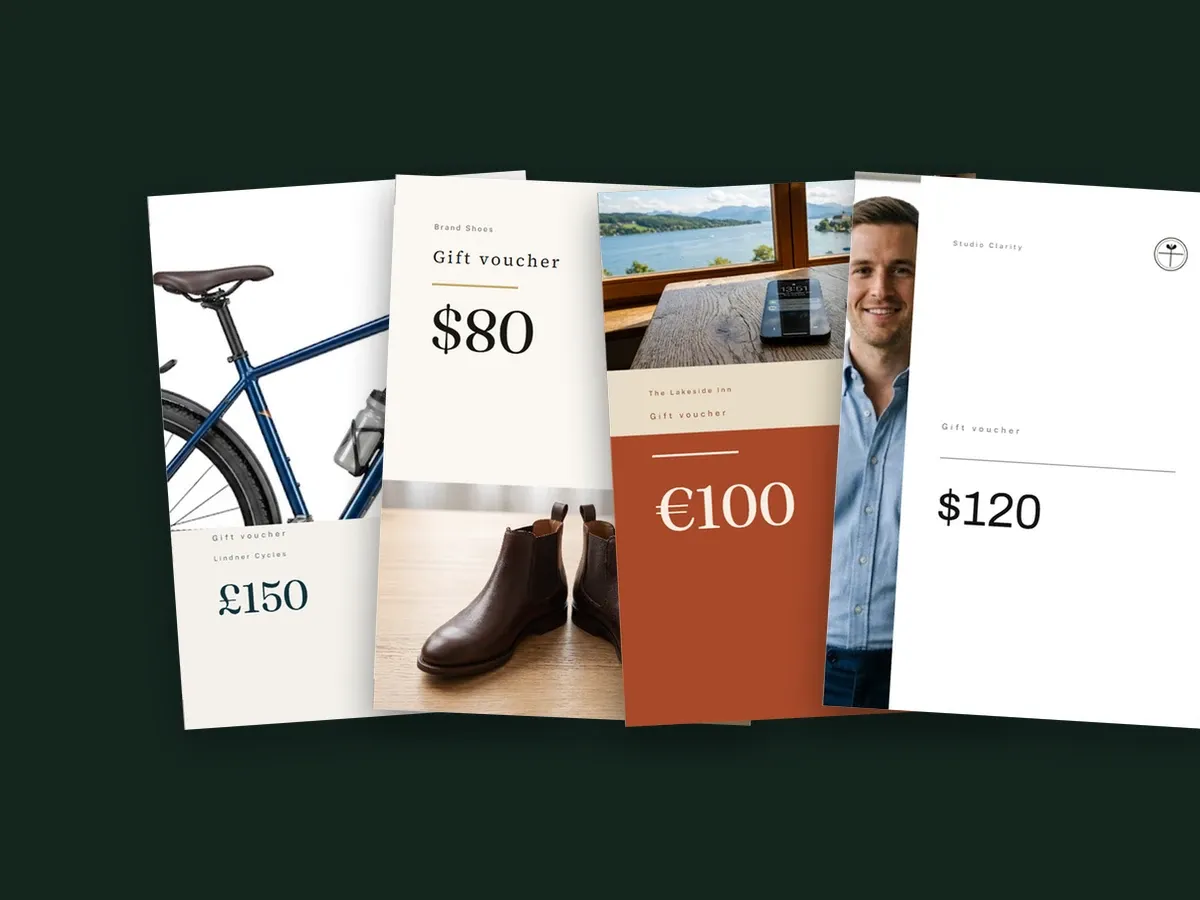
A Shopify gift card is a code in an email. Kartuu turns it into a folding card you design yourself, from one of six templates or freely in the editor, with the recipient’s name and a personal message.
You install it in your Shopify admin, which is easiest on a computer.
In production since August 2026 and installable from the Shopify App Store.
The app is available in English and German; the pictures further down show the English version.
„Lange gesucht, nicht fündig geworden.
Geschenkgutscheine bieten meinem Shop nochmal einen anderen Umsatzhebel. Wurde von Kunden oft danach gefragt und nativ habe ich leider nie die Qualität bekommen, die der Marke gerecht wird. Demnach sehr happy, dass die Lücke nun geschlossen ist.
Lieben Dank euch!“
“Searched for a long time, found nothing. Gift cards give my shop another lever for revenue. Customers often asked about them, and natively I sadly never got the quality that does the brand justice. So I am very happy that the gap is now closed. Many thanks to you all!”
Kartuu against Shopify's standard gift card, a purchased theme section and two gift card apps from the Shopify App Store.
| Our app Kartuu | Shopify standard | Purchased section | App 1 | App 2 | |
|---|---|---|---|---|---|
| Card instead of a code in an email | yes | no | not found | not found | no |
| Card right after purchase, no manual work | yes | no | no | not found | no |
| Place, rotate and resize freely | yes | no | not found | no | no |
| Preview before buying | yes | no | not found | not found | not found |
| A service instead of an amount (“3 hrs massage”) | yes | no | not found | not found | not found |
| No changes to your theme code | yes | yes | no | not found | not found |
| Updates and support included | yes | yes | yes | yes | yes |
Kartuu Free with no monthly fee (2.9% of the gift card value) or Kartuu Standard at $19 a month with no revenue share. Your gift cards stay valid even if you cancel.
App 1 and App 2 are two gift card apps from the Shopify App Store, based on their listings and help pages, as of 25 September 2026. The purchased section is a one-off gift card template whose files go into your theme, based on the seller's product page, as of 30 September 2026.
On the product page the buyer enters who the card is for and what it should say, sees the card in a preview as they type, then pays as usual. The recipient gets a PDF to fold and hand over. For an amount voucher, the code on it is a real Shopify gift card, redeemed at checkout like any other.
Forty-eight seconds from the code in an email to a folded card being handed over. With sound.
Just a code in an email? A card to hand over. The buyer picks the picture for their card, enters who it is for and who it is from, and sees it straight away. Download. Print. Folded from one A4 sheet. A real gift card. From a code to a gift. Names, message and your logo. Redeemed with you, for services too, say three hours of massage. You pick the template, the colours and the logo; Kartuu creates the gift card product. At the end: Kartuu: Gift Cards on the Shopify App Store.
The scenes and the voice in the film were created with AI and the shops in it are made up. The card and the screens of the app are real.
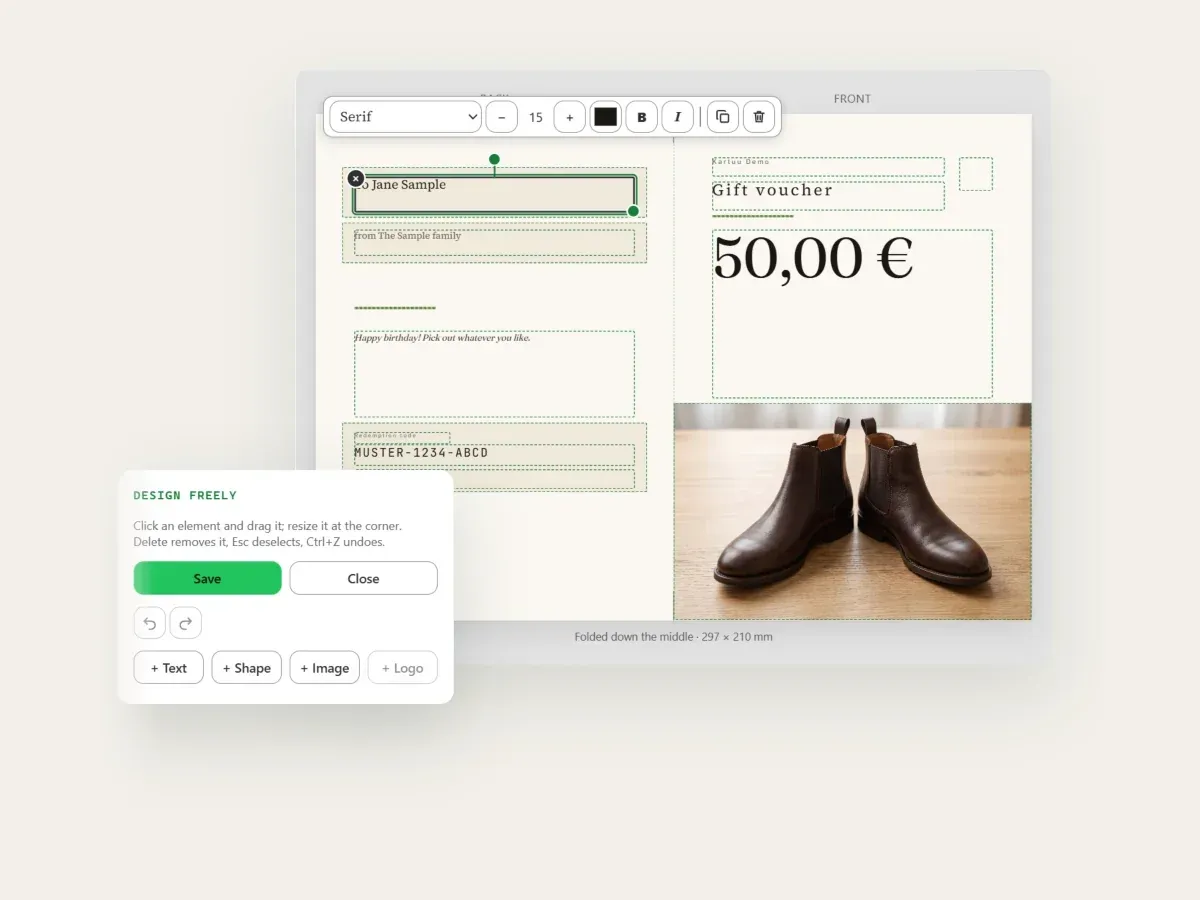
Every element of the card can be selected, moved and resized. You add text, shapes, images, logo and shop name yourself, with the mouse or entirely from the keyboard. For text there are also eight handwriting typefaces, all with umlauts, ß and €.
Your own logo, colours and images. Change a colour once and it changes everywhere in the design. Two logo versions can be stored, one for light and one for dark areas.
The preview is built on the server from the same document as the PDF. While you design, you see how the card looks as a folded card or cross-folded; a test print before going live is worth it.
You set up to four pictures per voucher, and your customer picks the one that goes on their card while buying. One product instead of three, and the card keeps your colours and your logo.
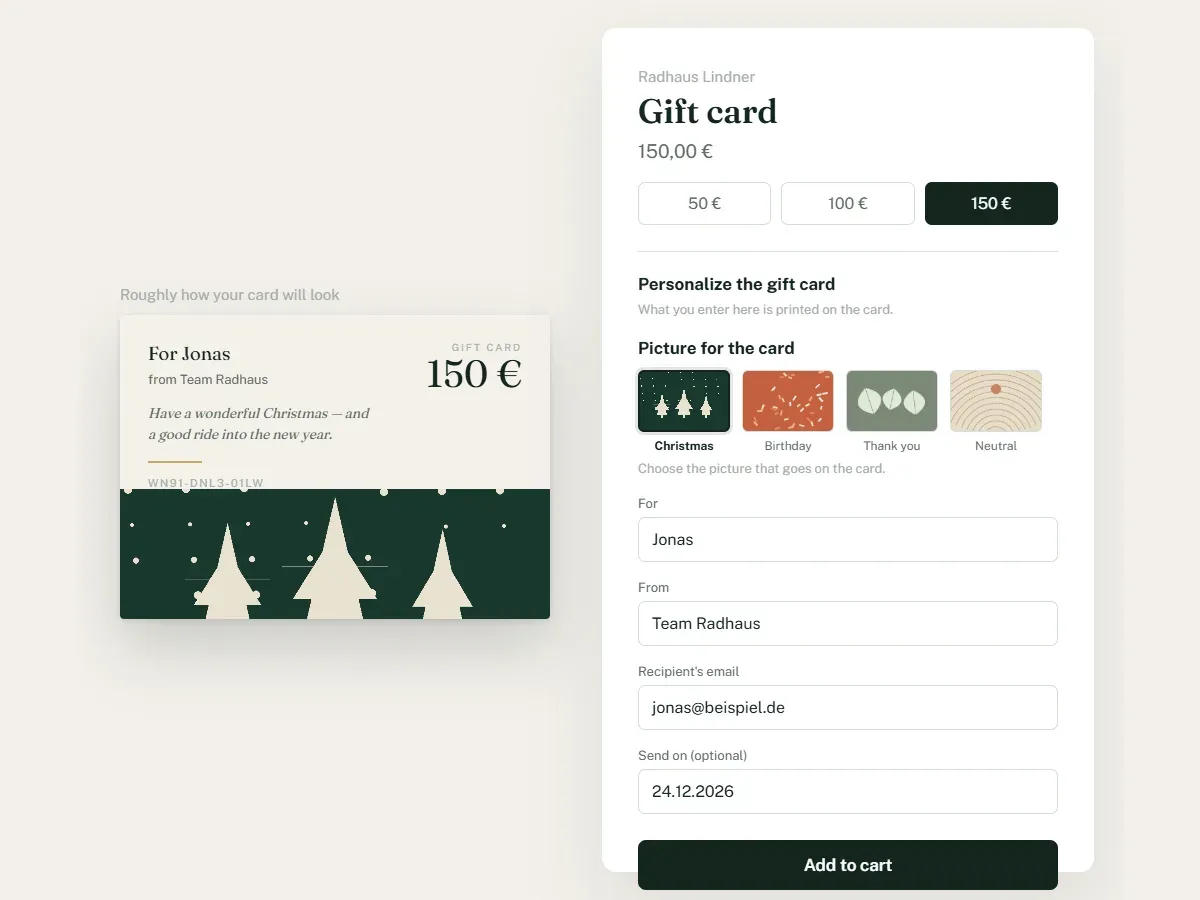
Under “Change the design” you decide which pictures are on offer. Each one gets a short caption; it becomes the alt text of the tile in your shop.
The pictures appear as small tiles. The buyer clicks one, the live preview switches straight away, and the card they buy carries exactly that picture.
Colours, template, logo and every other picture on the card stay as you set them. Only the one place you set aside for it is swapped. Offer no pictures and nothing changes.
This needs the Kartuu block on your product page and a design with a swappable picture slot. All six templates have one; in a freely designed card you mark a picture for it. Your shop’s picture store holds up to twenty pictures: logos, the artwork in your designs and the pictures on offer together.
Your photo, your colours, your logo on a folded card to print. Not a stock voucher with your name on it.
Every element can be moved, resized, rotated and swapped, or you stay with a template and change only the colours. You add text, shapes, images, logo and shop name yourself.
Workshop, inn, shoe shop, consultancy: the same app. You pick the template, colours and artwork; Kartuu sets the rest. The choice: Classic, Minimal, Typographic, Warm, Bold and Photographic.
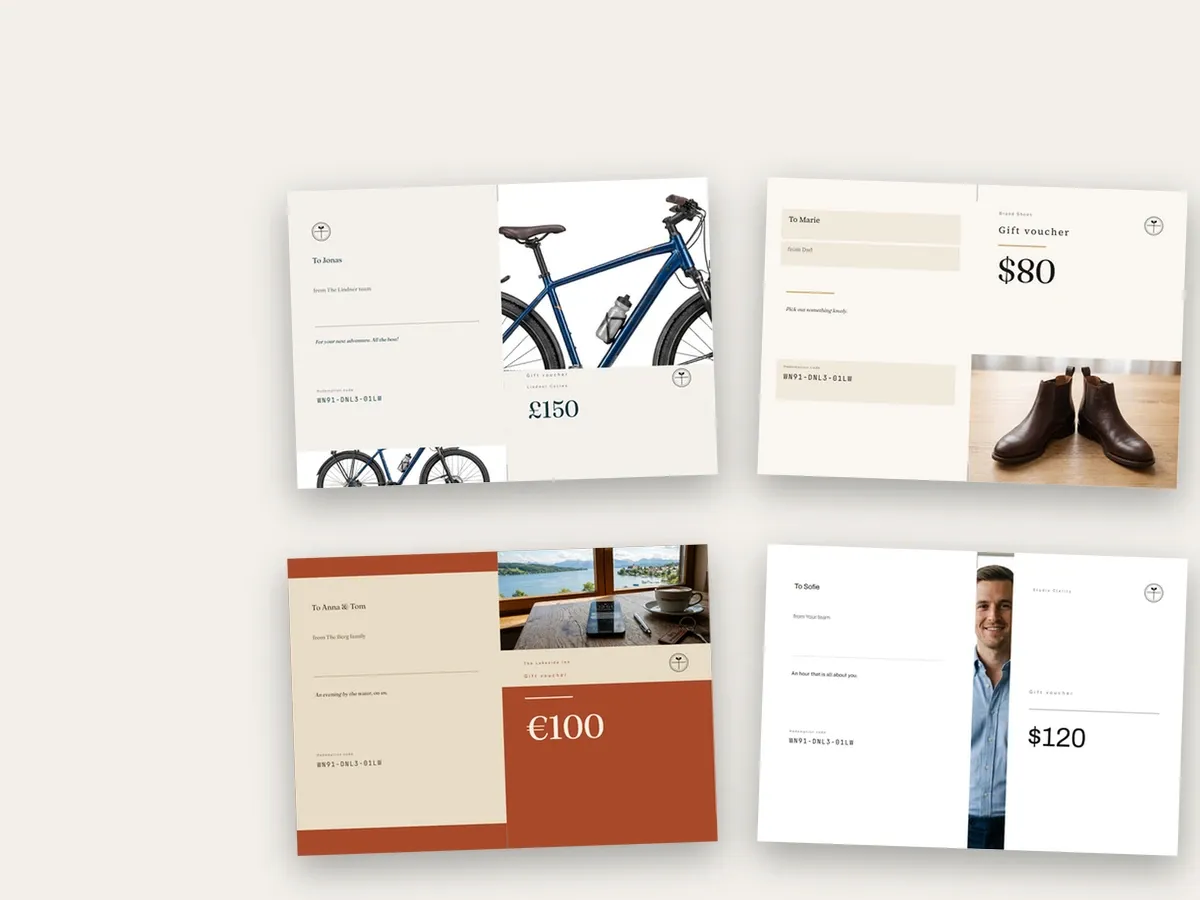
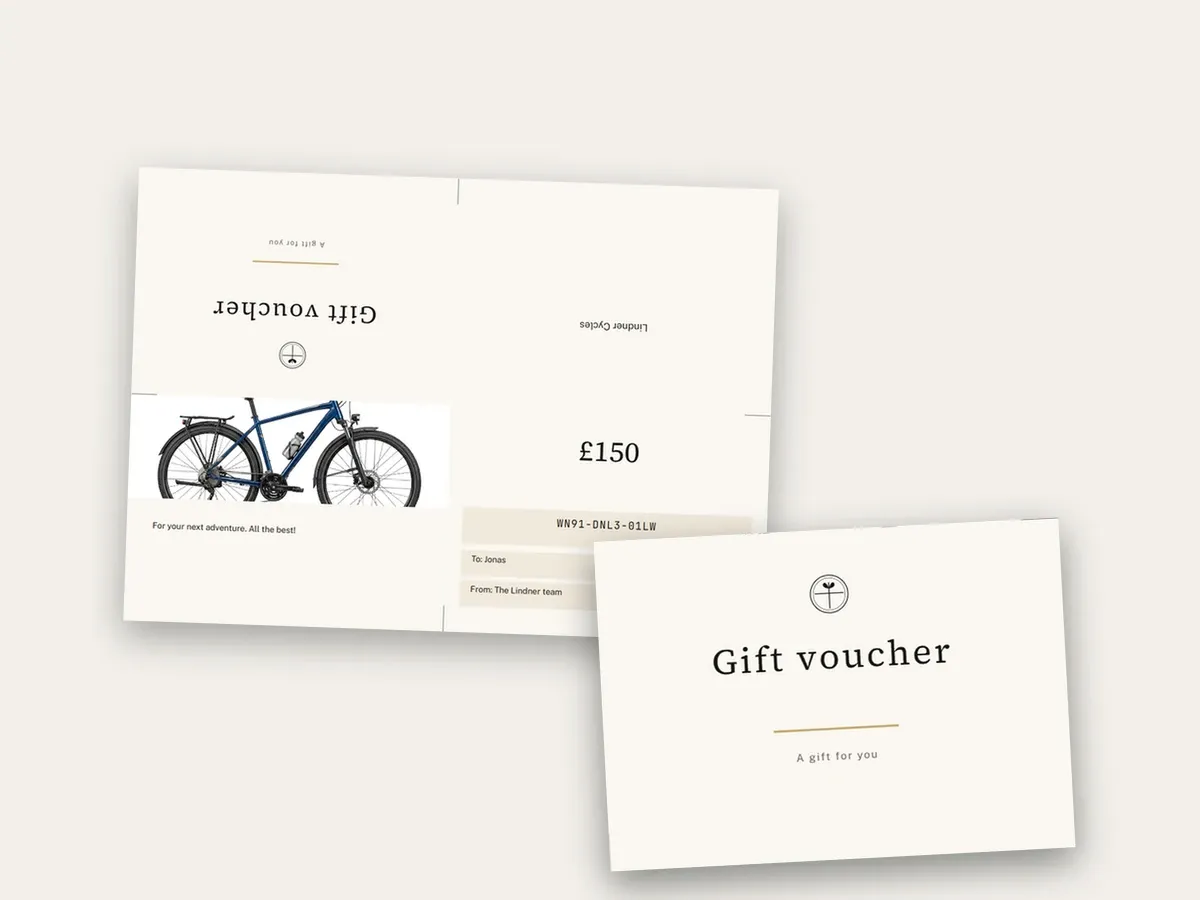
Folded once it becomes a two-page card; folded twice, a four-page cross fold, from the same sheet of A4, or US Letter for shops in the US and Canada. The PDF carries the fold marks; the folding instructions are on the download page and attached to the email.
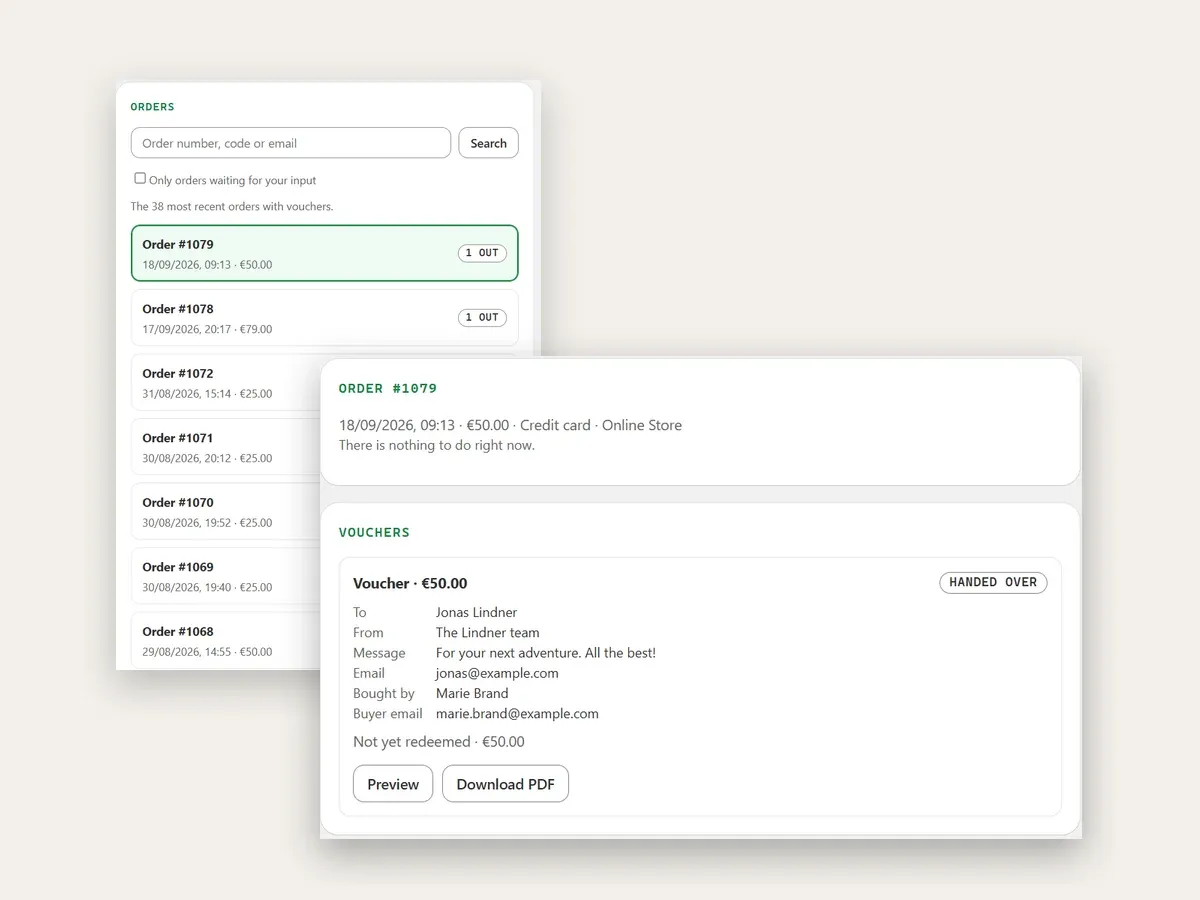
What has gone out and what is still waiting, and for every gift card the buyer’s details, the preview and the finished PDF, plus the redemption state for amount vouchers. The search finds order numbers, voucher codes and email addresses.
Recipient, sender and message appear on the card as the buyer types, and the amount follows their choice, right on your product page, with no click and no reload. Each gift card product shows its own design. The preview is approximate; printing breaks lines slightly differently.
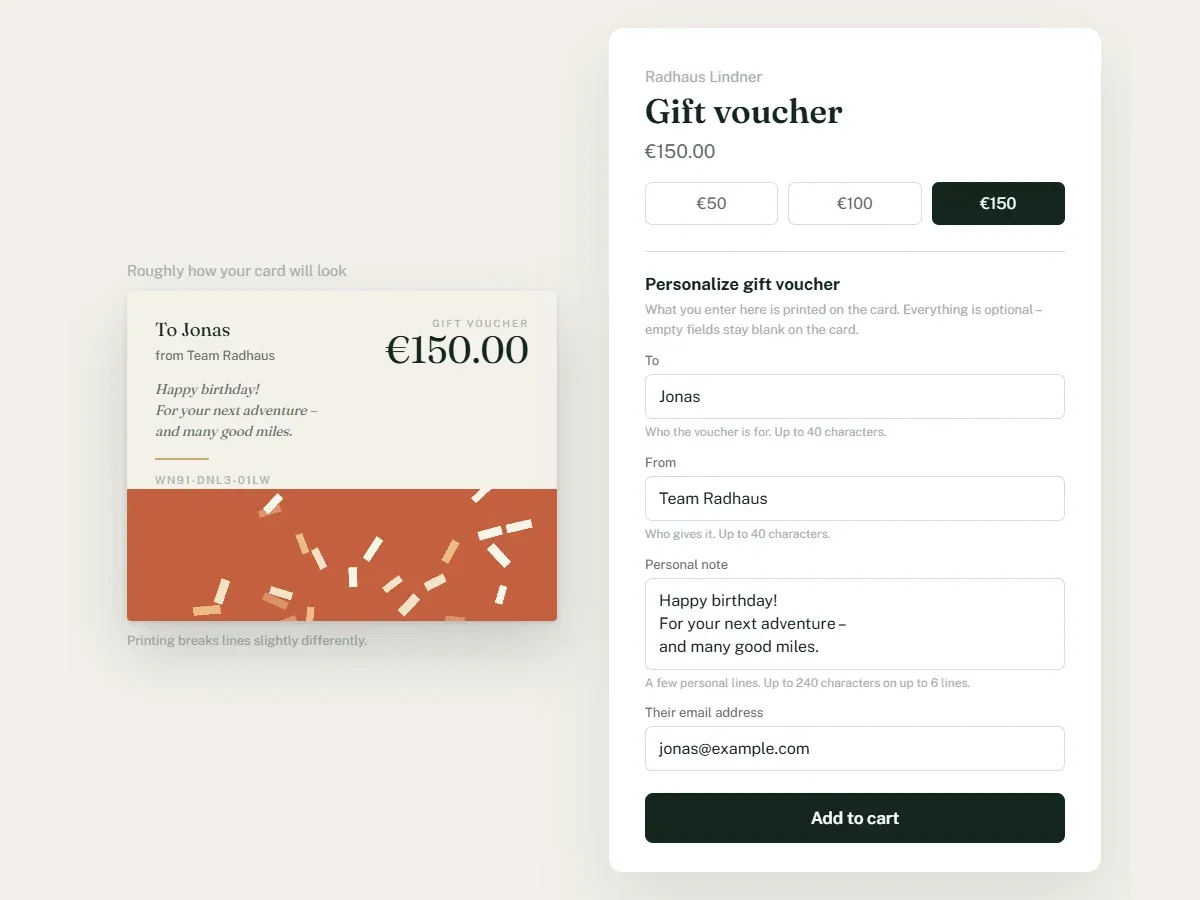
Sample cards for made-up shops; the photos on them are AI-generated. The orders come from our test shop, with names and addresses replaced. The product page in the last picture is a mock-up; the card in it is real.
For an amount voucher, the code is created through Shopify’s own interface. It appears in your shop’s gift card list, is redeemed at checkout and stays valid even if you cancel Kartuu: no separate system, no second balance to keep.
An amount to spend in the shop, or a service instead of a sum, say three hours of massage. You redeem the service yourself; the checkout does not. Kartuu creates the gift card products in your shop, each with up to 50 amounts and its own design, as many as you like.
A4 with fold marks, or US Letter for shops in the US and Canada; folding instructions on the download page. If you would rather post the card than forward it, print it and fold it.
Right after paying, the buyer sees on the thank-you page how their gift card is doing and downloads the card there. With email delivery set up through your own mailbox, Kartuu also sends the card to the recipient, on a day of the buyer’s choosing if they like.
Servers, database and the daily backups are in Berlin (IONOS). According to the app’s privacy policy (as of 17 September 2026), data leaves the EU only through Shopify itself and, for email delivery, depending on your mail provider. A data processing agreement is in place and confirmed during setup. Uninstall Kartuu and your shop’s data is usually deleted after 48 hours, at the latest after 30 days; it leaves the encrypted backups after 95 days at most.
No monthly fee
2.9% of the value of each gift card issued
US$19 per month
or US$199 per year
Up to about US$655 of gift card sales a month, Kartuu Free is cheaper; above that, Kartuu Standard. You can switch at any time in Kartuu under Settings, in the “Plan” section.
Amounts as listed in the Shopify App Store, as of 6 October 2026. Kartuu Standard plus VAT, both plans billed through your Shopify invoice. Offered to businesses only.
For amount vouchers, yes: Kartuu creates the gift card through Shopify’s own interface; it appears in your shop’s gift card list, is redeemed at checkout and stays valid even if you cancel Kartuu. A service voucher is not a gift card; you redeem it yourself. Kartuu keeps no balance of its own.
No. Shopify sells gift cards itself: according to the Shopify Help Center (as of 5 October 2026), the customer or the recipient gets a digital gift card with a unique code that is redeemed at checkout. Kartuu comes in when you want a custom gift card to print: in your own design, with the recipient’s name and a message, as a PDF to fold. It is not a plastic card; according to the same help pages, physical gift cards for Shopify POS can be ordered from the Shopify Hardware Store in supported countries.
They make it personal; the design stays yours. The buyer enters recipient, sender and message and, if you offer it, picks from up to four pictures you have set. They do not upload their own photos, and they do not change the colours, fonts or layout of the card.
Yes, if you offer it: under “Change the design” you set up to four pictures per voucher. They appear as tiles on the product page, the buyer clicks one, the preview switches straight away, and the card they buy carries that picture. Buyers cannot upload their own photos, and everything else (colours, template, logo) stays your design. It needs the Kartuu block on the product page and a design with a swappable picture slot; all six templates have one. Offer no pictures and the product page stays as it was.
Yes. You start from one of six templates (classic, minimal, typographic, warm, bold or photographic) and carry on in the “Design freely” editor: select, move and resize elements, add text, shapes, images, logo and shop name, set text in one of eight handwriting typefaces, and swap colours across the whole design. The preview is built on the server from the same document as the PDF.
Either. An amount to spend in the shop, or a service instead of a sum, say three hours of massage. You redeem the service yourself; the checkout does not.
On the product page the buyer enters who the card is for and what it should say, sees the card in a preview as they type, then pays at Shopify’s checkout. Kartuu generates the card as a PDF with fold marks on A4, or on US Letter with the card language “English (US)” that new shops in the US and Canada get by default: folded once as a two-page card or twice as a four-page cross fold. The buyer downloads it on the thank-you page. With email delivery set up through your own mailbox, the card also goes to the recipient, automatically or once you release it, on a day of the buyer’s choosing if they like (from 8 a.m. German time). The form and the thank-you page are each a Kartuu block that you place once in the theme or checkout editor.
Through the “Export” menu item. It shows the outstanding amounts per currency as of today: for amount vouchers the remaining balance as Shopify holds it, for service vouchers the face value of those not yet redeemed. Below that you download all vouchers sold through Kartuu as a CSV with order number, date, face value, discount, status and remaining balance, without names and without codes. The export is available on both plans. It is a spreadsheet for you or your accountant: it does not connect to accounting software, has no tax column and does not list individual redemptions.
Servers, database and the daily backups are in Berlin (IONOS). According to the app’s privacy policy (as of 17 September 2026), data leaves the EU only through Shopify itself and, for email delivery, depending on your mail provider. A data processing agreement is in place and confirmed during setup. Uninstall Kartuu and your shop’s data is usually deleted after 48 hours, at the latest after 30 days; it leaves the encrypted backups after 95 days at most.
There are two plans with the same features. Kartuu Free has no monthly fee; instead, 2.9% of the value of each gift card issued is charged. Kartuu Standard costs US$19 per month or US$199 per year with no revenue share, and the first 30 days are free (amounts as listed in the Shopify App Store, as of 6 October 2026). Up to about US$655 of gift card sales a month, Kartuu Free is cheaper; above that, Kartuu Standard. You can switch at any time in Kartuu under Settings, in the “Plan” section. The Kartuu Standard price is plus VAT, and both plans are billed through your Shopify invoice.
That depends on the plan. Kartuu Standard is a flat monthly fee with no revenue share and no tiers, however many gift cards you sell and whatever their value. Kartuu Free has no monthly fee; instead, 2.9% of the value of each gift card issued is charged, measured by the face value, for a service voucher by its selling price, without deducting discounts. If a gift card is cancelled, the fee for it lapses, and test orders do not count. Neither plan caps the number of gift cards; on Kartuu Free the fee grows with your gift card sales, with no ceiling. Shopify bills in US dollars, and Kartuu converts the gift card value at the European Central Bank’s daily rate.
The interface, the card and the email are available in English and German, and so are the two Kartuu blocks in your shop. The block on the product page appears in German if your shop is in German and in English otherwise; you can write its heading and field labels yourself in the theme editor. The block on the thank-you page follows the buyer: German if they shop in German, English otherwise. The legal documents are also available in English, as translations; the German versions are binding. We answer questions at support@kyth.systems in either language.
Guide: designing your own Shopify gift cards, step by step →
Market overview: Shopify gift card apps compared 2026 →
Printable Shopify gift cards: what is on the card and how it arrives →
Shopify gift card templates: the six templates and what each one comes with →
Kartuu can be installed from the Shopify App Store: on Kartuu Free with no monthly fee, or on Kartuu Standard with the first 30 days free. Questions first? Email us with your shop URL and we answer in English or German.
You install it in your Shopify admin, which is easiest on a computer.
Or write directly to support@kyth.systems