Shopify shipping app for DHL, DPD, UPS & FedEx KYTH.Karl
The Shopify shipping app that catches extended-area carrier surcharges before the label is printed, and auto-routes to the cheaper carrier.
“A clear recommendation from us, especially for anyone who regularly ships outside the EU …” Official FIBA Store, review on the Shopify App Store, translated from GermanKarl is available on the Shopify App Store: Start has no monthly fee for domestic shipping (€0.25 per label), and Pro with surcharge protection comes with a 14-day free trial.
Built for shops shipping from Germany and Austria with DHL, UPS, FedEx, DPD, Austrian Post or Deutsche Post, with an English-speaking team.
Karl in Action
Text of the video
In the explainer video (about 80 seconds) the narration in German is by founder Stefan Grasse (English subtitles are on by default); the interface shown is German with sample data. Narration in English: Hi, I'm Stefan from KYTH. Over the next minute I'll show you how Karl makes shipping easier for your Shopify shop. The dashboard shows you straight away what needs to go out today: fourteen open orders, straight from your Shopify shop. This order is going to Sylt. Karl recognises the remote area from the postcode. DPD would charge a €16.50 island surcharge here. The surcharge is already included in the rate comparison: DPD €21.35, UPS €14.80. DHL Parcel is the cheapest at €4.99 and is recommended. Accept the recommendation, “Create & print label”, done. The tracking number goes to Shopify automatically. In Scan & Ship you simply scan the delivery note. With Auto-Print the label is created at once and goes straight to the printer. Abroad, here to London: the HS code, country of origin and customs value come from Shopify. Customs complete: Karl creates the pro forma invoice as well. Busy day? Select all orders and Karl picks the right carrier with Smart Routing and creates all the labels at once. That was Karl. Scan. Print. Repeat. Try it free for fourteen days. I look forward to your feedback.
Eight screens. One flow.
Click through the eight most important views. This is how Karl feels day-to-day, not a mockup but a real interface.
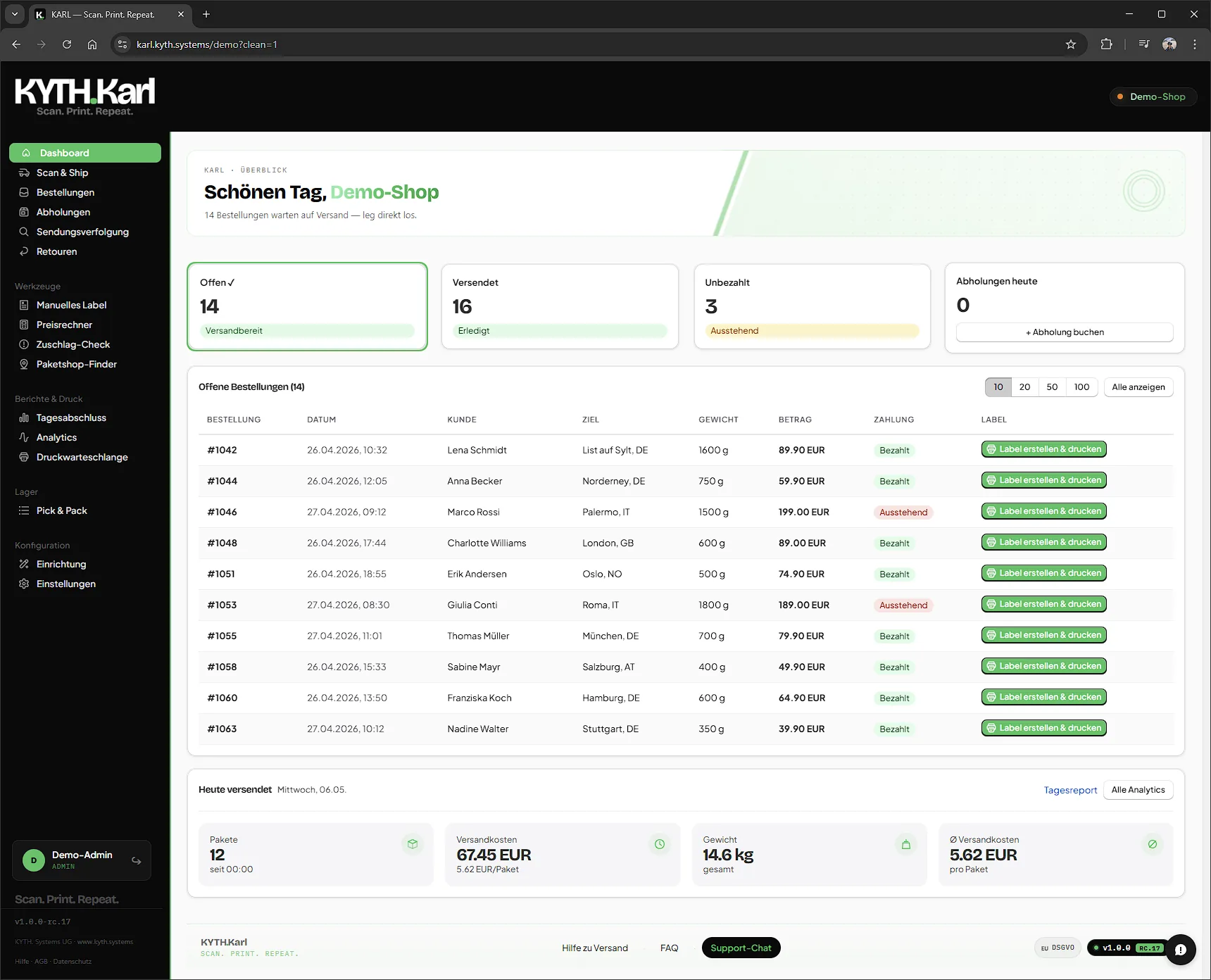
- 01 / 08Dashboard
One glance. Everything under control.
Open orders, today’s pickups, daily revenue, surcharge shield. The morning coffee takes longer than the situation report.
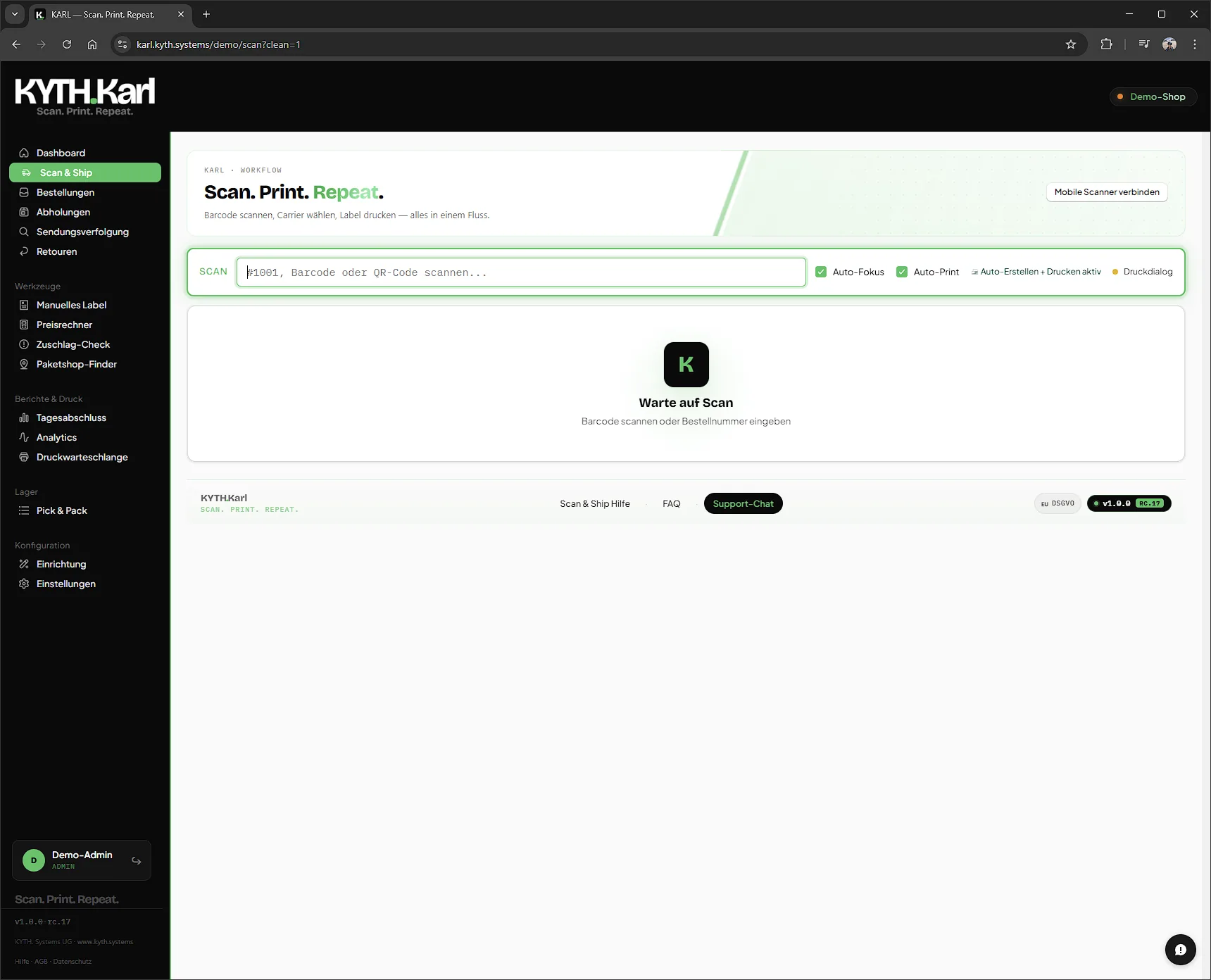
- 02 / 08Scan & Ship
Scan. Print. Repeat.
Scan the barcode, order loads, cheapest carrier preselected, label prints. No click, no mouse, no carrier swap across two tabs.
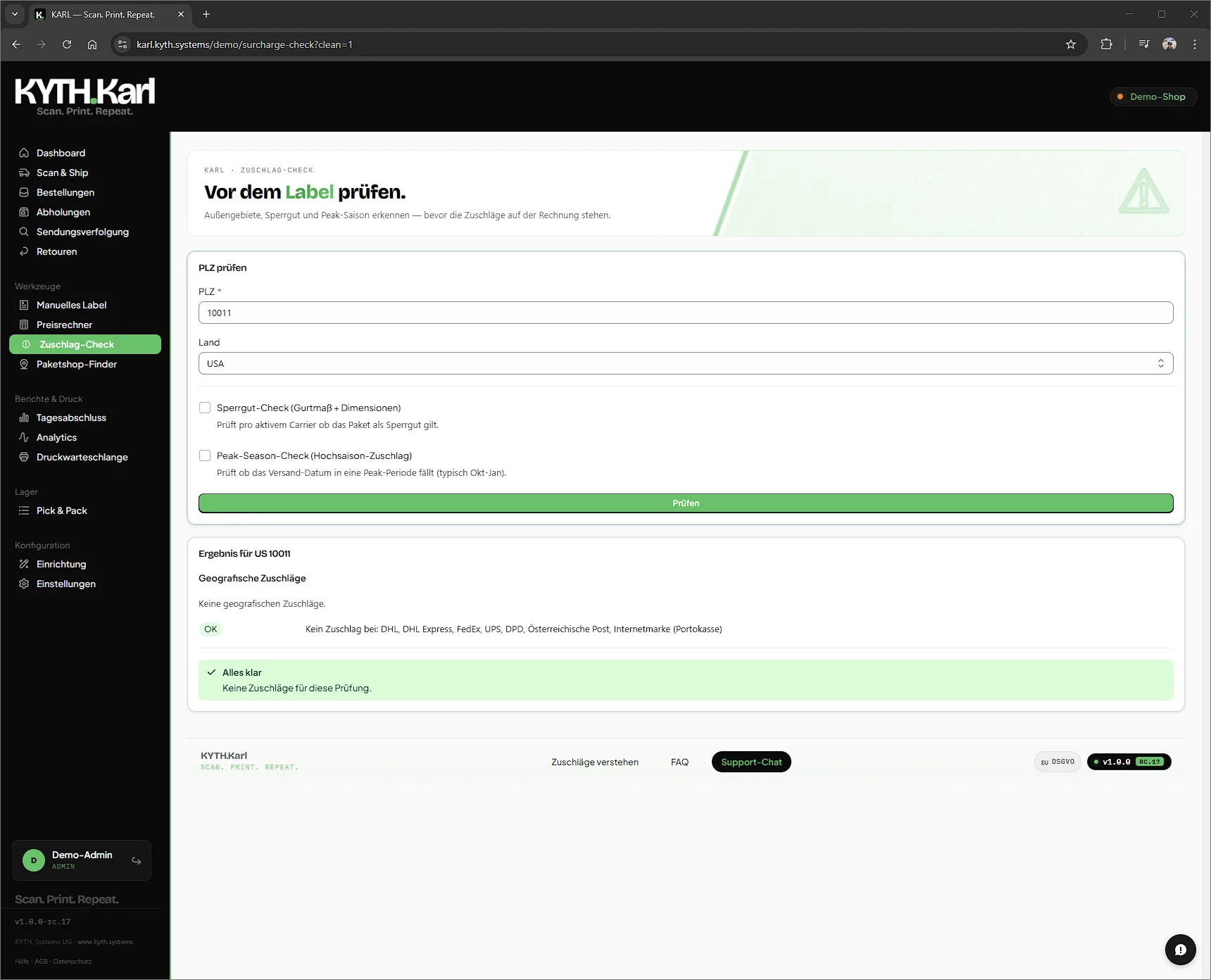
- 03 / 08Surcharge Check
See surcharges before you pay them.
Enter a postcode: Karl checks remote-area and island surcharges for UPS, FedEx, DHL Express and DPD, and optionally oversize and peak season.
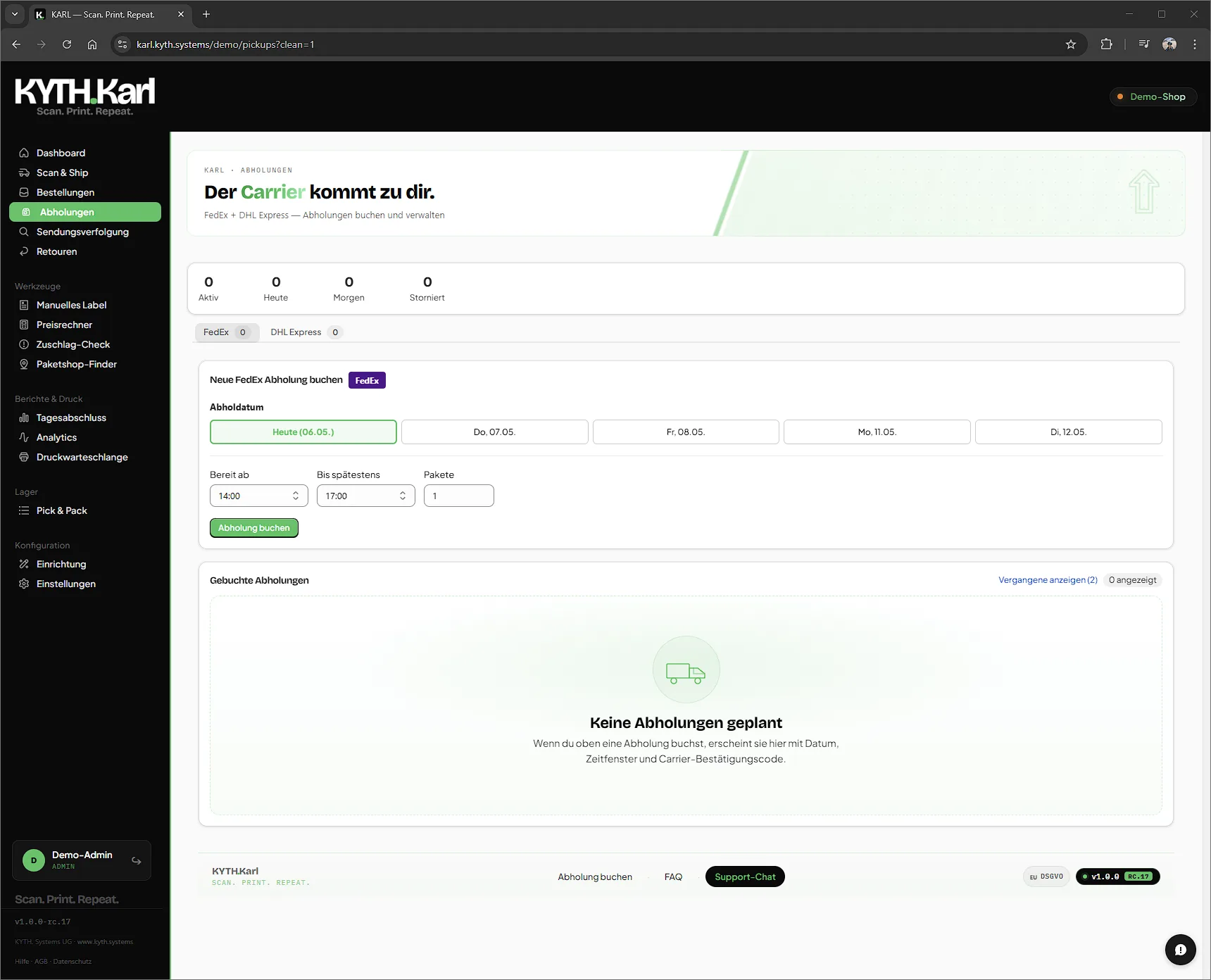
- 04 / 08Pickups
Book a pickup, no trip to the branch.
FedEx, DHL, DHL Express, UPS straight from Karl. Preferred time slot, number of parcels, done. Booked pickups neatly overviewed.
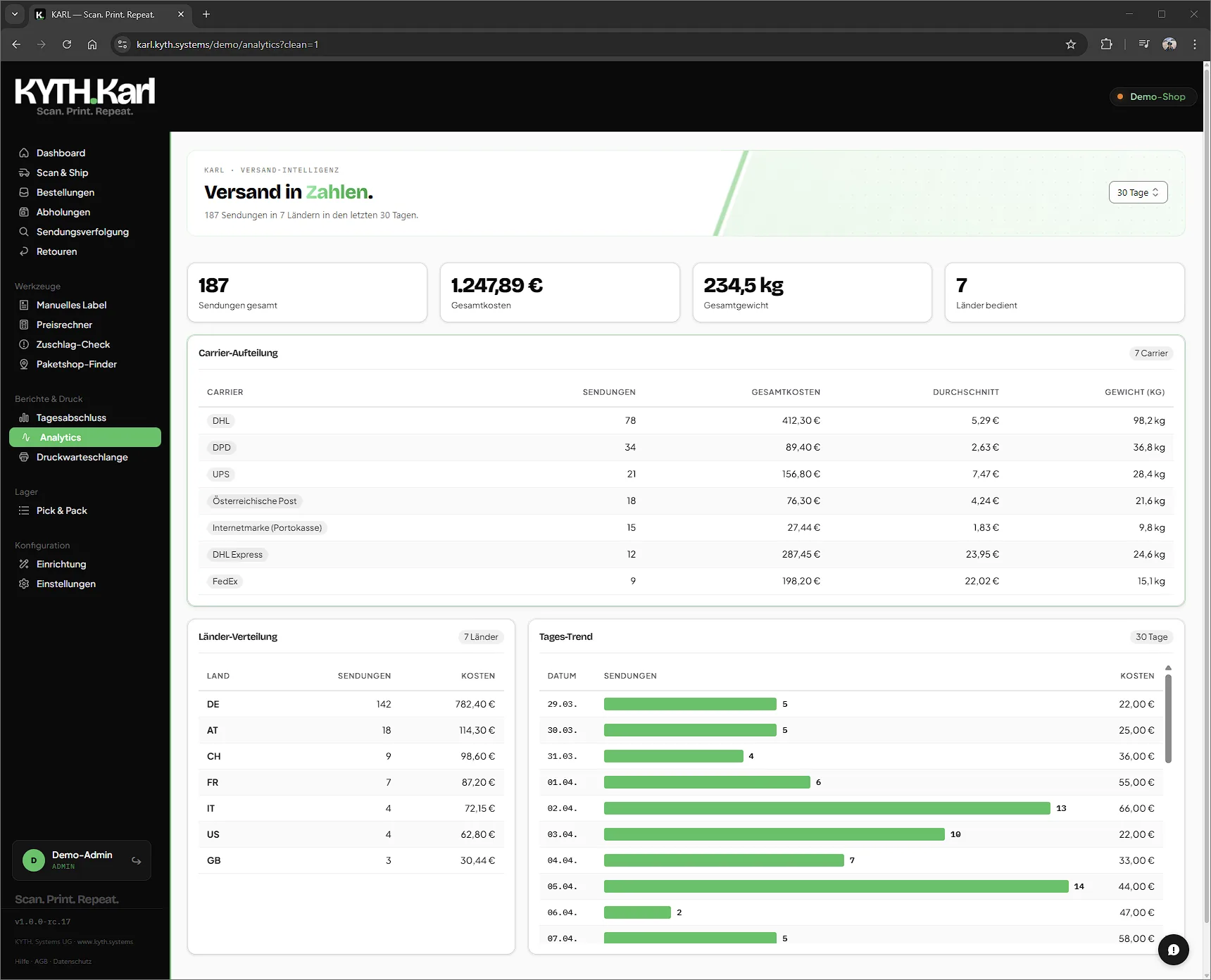
- 05 / 08Analytics
Numbers that carry decisions.
Carrier split, country distribution, daily trend, weight, average value. See instantly where money leaks and where you save.
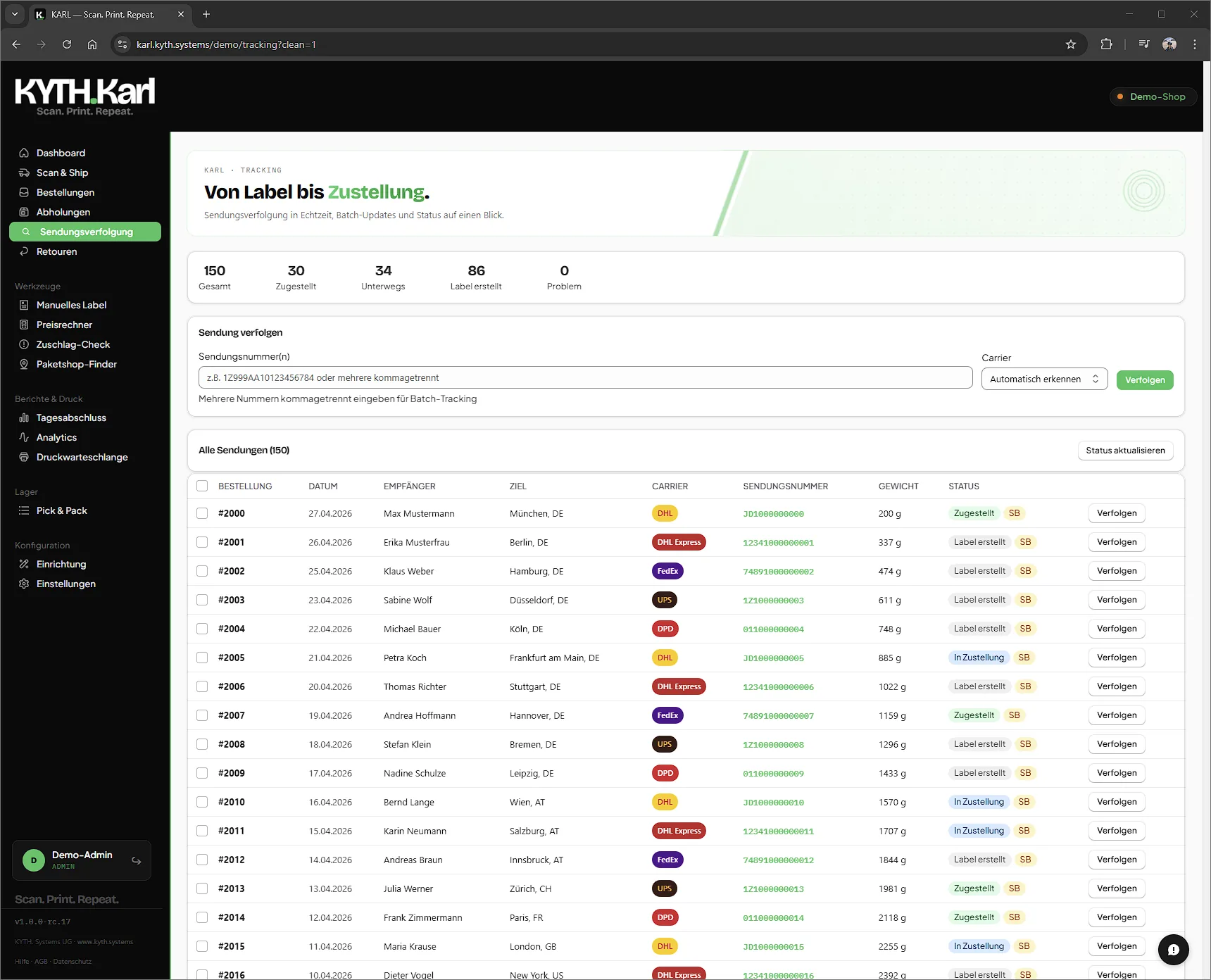
- 06 / 08Tracking
One tab. All carriers.
Never four tracking portals open again. Every shipment, every status, one single screen. Including filter and search shortcut.
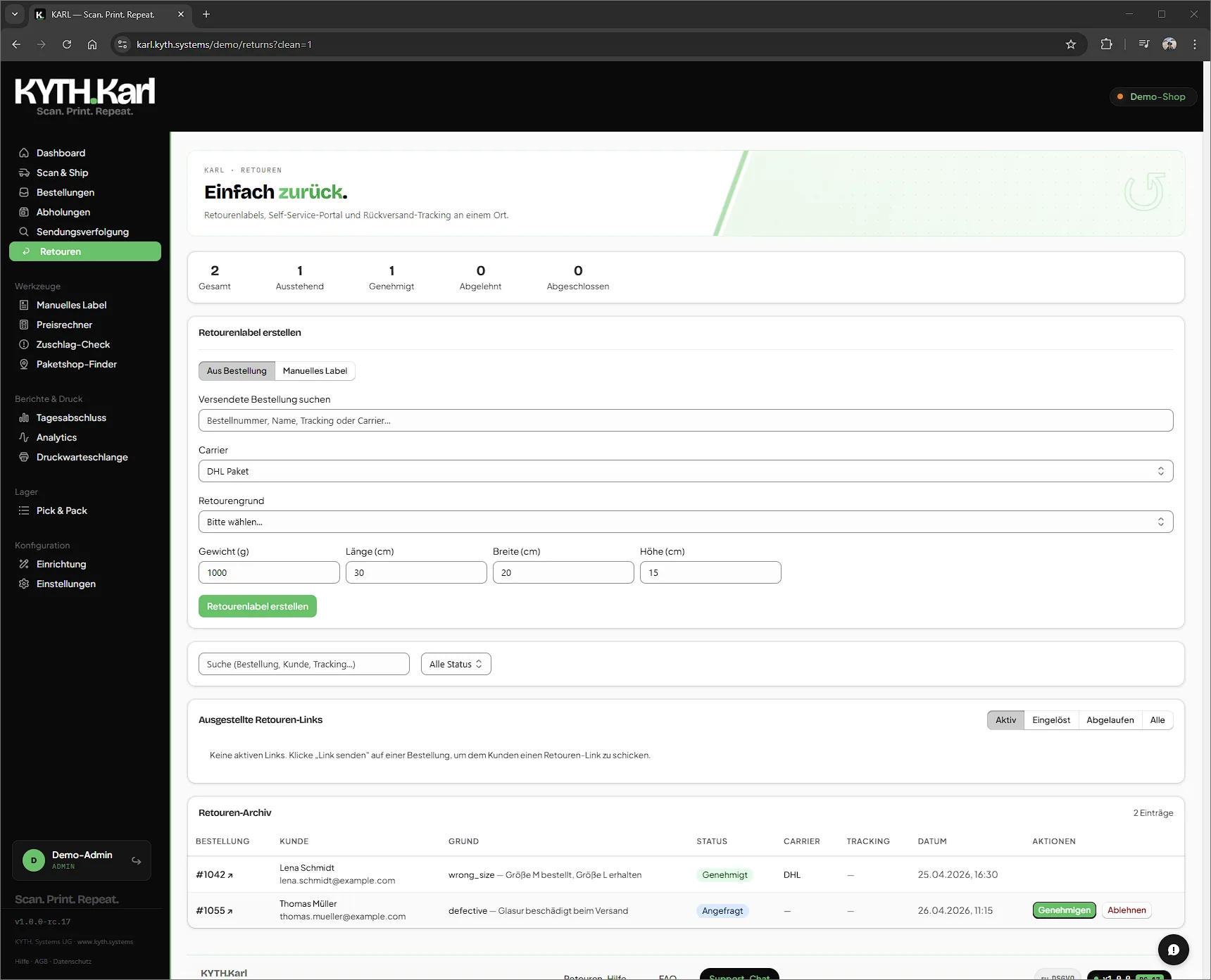
- 07 / 08Returns
Returns portal with your branding.
The customer opens a page with your logo, your colours. Return initiated, label generated, status tracked, fully automated. From Karl Pro.
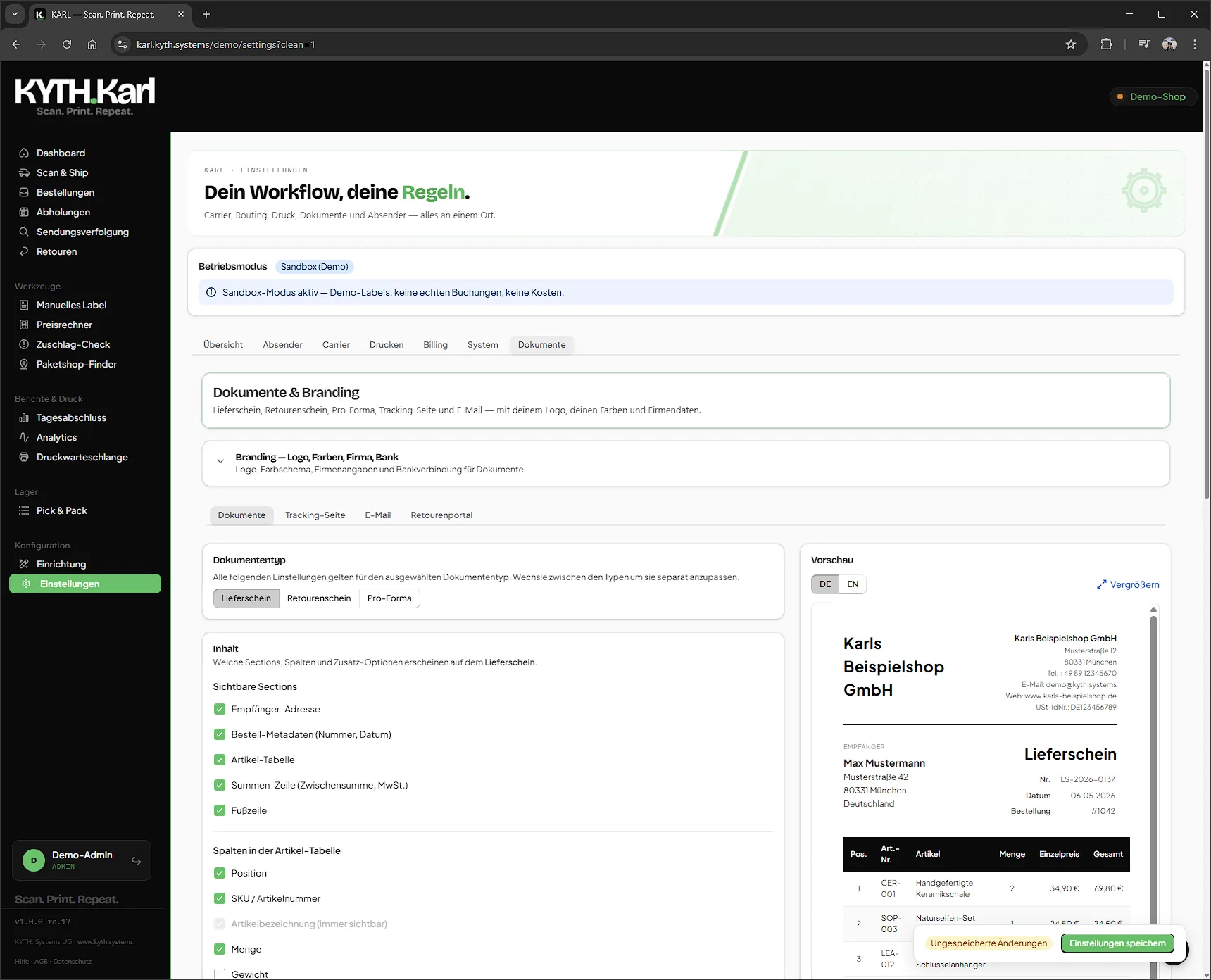
- 08 / 08Branding Pack
Your logo. Everywhere customers see Karl.
Tracking page, emails, delivery notes, returns portal: all in your corporate design. Four styles: Modern, Classic, Minimal, Boutique. One switch.
Karl's interface is in German. Support is available in German and English.
Ctrl+C, Ctrl+V. Or one scan.
Karl against Shopify Shipping, the carrier's own customer portal and two shipping apps from the Shopify App Store.
| Our app Karl | Shopify Shipping | Carrier portal | App 1 | App 2 | |
|---|---|---|---|---|---|
| Label from the order, no retyping | yes | yes | no | yes | yes |
| Scan, out comes the label | yes | not found | no | not found | not found |
| Own contract, billed directly | yes | no | yes | yes | yes |
| DHL, UPS, FedEx, DPD in one app (from Pro) | yes | no | no | no | yes |
| Surcharge check before the label (from Pro) | yes | not found | not found | not found | not found |
| App fee in euros via Shopify | yes | not found | not found | not found | no |
Karl Start with no monthly fee: €0.25 per domestic label, the first 14 days free, including label creation. International shipping, all seven services and the surcharge check from Pro, 14-day free trial.
Shopify Shipping according to the Shopify Help Center: in Germany DHL Paket and DHL Express Europe through Shopify's own carrier accounts. App 1 and App 2 are two shipping apps from the Shopify App Store, details from their listing and website, as of 25 September and 5 October 2026. Carrier portal means: the label in the carrier's customer portal, details typed in by hand.
Four stops. One parcel.
This is how an order runs through Karl, from open order to hand-over to the carrier. Each stop shows what Karl takes care of there.
-
Order open
Check first, then print.
Address, surcharges and route are settled before a label exists. Mistakes show up while they still cost nothing.
4 carriers with extended-area check
All features at this stop 5
- Pre-Label Surcharge Check
- Karl checks every address for extended area surcharges before the label is printed, not later on the consolidated carrier invoice. If another carrier covers the route without a surcharge, Karl switches automatically. It also flags oversize and additional-handling surcharges from length, girth, weight and, for UPS, the second-longest side, plus dated peak-season fees within their exact window. All of it lands in the cost calculation up front, before the label exists.
- Smart Routing
- Karl uses smart routing rules to automatically decide the optimal carrier and service for every shipment. Weight, destination, goods value, incoterm and your origin country: merchants in Austria automatically get the right AT carriers. No manual selection.
- Check addresses before the label exists
- Karl catches typical address errors before printing: swapped street and house number (German vs. international format), mixed-up Packstation and post numbers and it validates Irish Eircodes. Instead of an expensive return, you get a suggested correction. A depth of validation rarely found in shipping apps.
- Fix it where the error happens
- When a label fails on recipient data (because FedEx requires a phone number, say, or an international address is incomplete), you correct phone, postcode and city right in the error notice and recreate the label instantly. No detour through Shopify, your input is preserved. Instead of a generic error, Karl names the real, fixable cause.
- Ready for the exceptions
- Karl handles the edge cases that block labels elsewhere: tip line items no longer count toward customs value or the commercial invoice, goods values are declared in the actual order currency, and over-sized or over-weight parcels are caught before printing, across all carriers.
-
Being packed
One scan. One label.
Scan the barcode, Karl loads the order and the label comes out of the printer. Scale, scanner and printer are wired straight into the flow.
under 5 seconds per label
All features at this stop 6
- Scan-to-Label
- Scan barcode: done. Karl loads the order, recommends the carrier, prints the label. One scan, zero extra clicks, from order to parcel in under 5 seconds.
- USB scale, no retyping
- Plug in the scale, put the parcel on it and Karl pulls the weight straight into label creation. The right weight means the right carrier and the right price, with no manual entry.
- Scanner on the bench, phone in hand
- Scan with the USB handheld scanner at the bench, or use your phone as a mobile scanner via QR code. The order loads in under a second.
- Print silently, no tab open
- The Print Companion prints labels silently to your thermal printer, no browser dialog, no open tab required. Install it once and it keeps itself up to date.
- Never a label twice
- When the Companion and the print queue run on the same PC, the browser skips labels the Companion is already printing. Every label leaves the printer exactly once.
- Bulk label printing
- Tick several orders, click once: Karl books all labels and, if you like, sends them straight to your label printer. The app calls this “Stapel”. From Karl Pro.
-
Label created
Your contracts. Your rates.
Seven carriers, your own terms. Karl is not a reseller: the carrier bills you directly.
7 carriers, 190+ countries
DHL DHL Express UPS FedEx DPD Austrian Post InternetmarkeAll features at this stop 6
- Not a reseller
- The carrier bills you directly. Your negotiated prices and carrier relationship stay yours.
- Ready right away
- Ship without a carrier contract via the Deutsche Post Internetmarke, topped up through your Portokasse, on the Start plan with no monthly fee.
- Mix per carrier
- Your own account where you have one; Internetmarke where you don't (yet).
- Large & split orders
- Split one order across several shipments, each with its own label, customs document and tracking, or spread a large order box by box across multiple packages, with its own weight per box. With DHL Express, FedEx and UPS all boxes ship as a single multi-piece consignment at a consolidated rate that is often cheaper than the sum of the individual parcels.
- Third-party split billing
- Transport on one carrier account, duties and taxes on another, split per shipment. Bill B2B orders cleanly when your customer ships on their own FedEx or UPS account. (Enterprise)
- ETD & Paperless Trade
- Automatic customs documents for DDP, DAP and DDU incoterms.
-
Handed to the carrier
Handed over. And on record.
Book pickups from the app, every shipment logged, and an interface for your ERP or WMS.
50+ fields per shipment
All features at this stop 3
- Pickup Booking
- Book and manage pickups for all carriers directly from the app.
- Audit-proof shipping log
- Over 50 fields per shipment, including the full carrier exchange as JSON, right inside the order. When customs, a claim or an insurer asks, you hold the complete record of what went to the carrier and what came back. (Enterprise)
- REST API for ERP & WMS
- Pull orders, compare carriers and create labels straight from your ERP or WMS. A dry run fully validates a shipment without buying real postage, an idempotency key prevents duplicate labels on retries, and shipment status plus delivery date flow back into your system. (Enterprise, requires a connected Shopify store)
Built by a Shopify merchant, not on a drawing board
Co-founder Stephan Wittmann has run the successful Shopify store alpen-werk.de for years. Every surcharge, every return and every bottleneck at the packing table from his daily shipping routine is built into Karl, which is why Karl solves real merchant problems instead of theoretical feature lists.
Stephan Wittmann · Co-founder & CMO · runs alpen-werk.de
„Wir sind vor allem vom Versand in Nicht-EU-Länder begeistert, seit wir KARL einsetzen. Besonders hilfreich: Das Programm prüft vor der Labelerstellung, ob die Zollangaben vollständig und korrekt sind, und weist aktiv auf fehlende oder fehlerhafte Angaben hin. Dadurch haben wir immer gültige Zolldokumente – Zollinhaltserklärung und Handelsrechnung werden zuverlässig und automatisiert erstellt. Seitdem laufen unsere Sendungen in Drittländer spürbar reibungsloser und fehlerfrei durch den Zoll, was uns vorher regelmäßig Probleme bereitet hat.
Positiv hervorzuheben ist außerdem der Support. Bei Rückfragen bekamen wir schnell direkte und kompetente Antworten vom Entwicklerteam – spürbar persönlicher Support statt anonymem Ticketsystem.
Für uns eine klare Empfehlung, gerade für alle, die regelmäßig ins Nicht-EU-Ausland versenden und die Zollabwicklung vereinfachen wollen.“
“Above all, we have been delighted with shipping to non-EU countries since we started using KARL. Particularly helpful: before creating the label, the program checks whether the customs details are complete and correct, and actively flags missing or incorrect information. As a result, we always have valid customs documents: the customs declaration and the commercial invoice are created reliably and automatically. Since then, our shipments to third countries have cleared customs noticeably more smoothly and without errors, which used to cause us problems regularly. The support also deserves a mention. Whenever we had questions, we got quick, direct and competent answers from the development team: noticeably personal support instead of an anonymous ticket system. A clear recommendation from us, especially for anyone who regularly ships outside the EU and wants to simplify customs clearance.”
Karl pricing plans
Karl Start
No monthly fee, you pay per label only, up to 1,000 labels per 30 days. For shipping within one country: sender and recipient in the same country.
- Deutsche Post prepaid (Warenpost National up to 1 kg, no contract)
- DHL Paket on your business customer contract (GKP), for senders in Germany
- Austrian Post with your own account, for senders in Austria
- Scan & Ship
- Drop-off point finder (parcel lockers, shops, branches)
- Documents (packing slip and more)
- Tracking
- Auto-fulfilment
- Chat and email support in German and English
Karl Pro
All 7 carriers with smart routing, extended-area surcharge protection and live-rates comparison.
- Everything in Start
- All 7 carriers (DHL, DHL Express, FedEx, UPS, DPD, Austrian Post, Internetmarke)
- Extended-area surcharge protection (UPS, FedEx, DHL Express, DPD)
- Smart routing
- Bulk label printing: several labels at once
- Multi-carrier smart routing
- DE + EU + EFTA shipping (Switzerland, Norway, Iceland, Liechtenstein)
- Return labels
- Live-rates comparison
- Bring your own carrier rates
Karl Enterprise
Everything in Pro plus every add-on except the eBay Connector, international shipping with customs, ETD, DDP, split-billing and a public shipping API.
- Everything in Pro
- All add-ons included (except the eBay Connector)
- International shipping (worldwide, customs, ETD, DDP)
- Multi-package
- Split-billing (third-party accounts)
- Public Shipping API (REST)
- Audit trail (52+ fields per shipment, with API request/response)
- Lowest per-label price €0.07
- Priority support
Karl is not a reseller: the carrier always bills you directly.
Set up together. In 30 minutes.
Stephan Wittmann, co-founder of KYTH, sets Karl up with you on a video call. The call only uses test mode with a test order. We do not record the call or take notes. The appointment costs nothing.
Booked via Google Calendar, held on Google Meet. Prefer to avoid Google? Write to support@kyth.systems.
Ten modules: book what you need, when you need it
Ten modular add-ons, bookable individually or as a bundle. Some unlock at Start, most at Pro. Karl Enterprise already includes every add-on except the eBay Connector.
Analytics
From StartCarrier mix, daily shipping trends, country breakdown, routing recommendations and rate-comparison stats. Reporting for under €5. The Today KPI on the dashboard stays free across all plans.
Mobile Scanner
From StartPhone as scanner via QR pairing replaces classic hardware scanners. Web-based, no app install.
Auto-Print on Paid
From StartAs soon as Shopify marks an order paid, label + documents print automatically. No manual click.
Pick & Pack Pro
From ProPick lists with item-level scanning and SKU verification against Shopify line items. Cuts pack errors.
Branded documents
From StartCustom logo, colours, fonts and bank details on packing slip, return slip and proforma. 4 styles × 3 doctypes × 2 languages.
Branded emails
From ProCustom styles for shipping confirmations, return invitations, label cancellations and the "parcel delivered" email, the latter with an optional review link and discount code. The cancellation email automatically notifies the customer when a label is voided. 4 styles × 2 languages.
Branded tracking
From StartYour own tracking page at karl.kyth.systems/t/<shop>/<tracking> with logo, colours and a personal message, instead of the raw DHL/FedEx/UPS page. Includes a QR code on the packing slip, estimated delivery date, a discount code for the next order and a "rate us" button at the unboxing moment.
Returns portal
From ProCustomer-facing self-service returns with tracking token, hosted in the EU. 4 branded portal styles included.
Pickup booking
From ProPickup at your shop for FedEx, DHL, DHL Express, UPS. No more drop-off trips.
eBay Connector
From ProeBay orders appear automatically in your unified Karl order list: ship via all carriers incl. smart routing and surcharge protection, and tracking is written back to eBay automatically after printing.
Buy-N-Save: bundle discounts
Three bundles, three use cases. If you need multiple modules, save up to 30%. Karl Enterprise already includes the All-in Bundle.
Warehouse bundle
Saves 3 €/mo- Mobile Scanner
- Auto-Print on Paid
- Pick & Pack Pro
Branding bundle
Saves 4 €/mo- Branded documents
- Branded emails
- Branded tracking
All-in bundle
Saves 18 €/mo- All 9 add-ons included
- −Connectors (e.g. eBay), booked separately
How much do you save with Karl?
- Karl Start ·
- Karl Pro ·
- Karl Enterprise ·
Base price plus label fees at the volume you set. Label fees are capped per month: €250 on Start, €300 on Pro, €500 on Enterprise. Start stops at €250 (1,000 labels per 30 days), covers domestic shipping only and has no surcharge protection; the saving above applies from Pro. All prices in EUR plus VAT.
* Non-binding example calculation. The display uses a simplified assumption (parcels × avg. surcharge × 15 %). Actual savings depend heavily on carrier rates, postcode mix, shipment structure and avoidance rate: the most reliable estimate comes from your own DHL consolidated invoices.
All prices in EUR plus VAT, billed through your Shopify invoice. Offered to businesses only.
Frequently Asked Questions
Who is Karl for?
Shopify shops shipping from Germany or Austria with DHL, DHL Express, UPS, FedEx, DPD, Austrian Post or Deutsche Post (Internetmarke), including teams whose working language is English. Domestic shipping from Karl Start (no monthly fee), EU and EFTA destinations from Karl Pro, worldwide from Karl Enterprise.
What makes Karl different from other Shopify shipping apps?
Three things: the surcharge check before the label is printed (extended areas for UPS, FedEx, DHL Express and DPD), smart routing on your own carrier contracts instead of reseller rates, and scan-to-label in under 5 seconds. Servers and database are in Berlin (IONOS).
Can Karl create and print many shipping labels at once?
Yes, from Karl Pro. With bulk label printing (called “Stapel” in the app) you tick several open orders, Karl books all labels in one run and sends them to your label printer or to the print queue. For single orders you scan the order barcode and have the label in under 5 seconds.
Does Karl create customs documents for shipments outside the EU?
Yes, with Karl Enterprise. Before every non-EU label Karl checks that each line item carries an HS code, asks for missing ones straight away and creates the customs documents for DDP, DAP and DDU with ETD and Paperless Trade. Tip line items are kept out of the customs value.
Do I need my own carrier contract?
For Deutsche Post Warenpost the Portokasse is enough: top up the balance and you're set, no contract needed. DHL Paket requires your own DHL business customer contract: you connect your business portal (GKP) while Karl's shared API provides the technical connection, no separate API contract needed. You connect UPS by logging in to your UPS account and authorising Karl, plus your customer number, with no API credentials of your own. FedEx connects with your own customer number; DHL Express, DPD and Austrian Post with your own account plus your own API credentials (bring-your-own API key). Warenpost and DHL Paket (senders in Germany) and Austrian Post (senders in Austria) already work on Karl Start with no monthly fee, for domestic shipping. Karl is not a reseller: the carrier always bills you directly.
How does surcharge protection work?
Before every label, Karl checks whether the address falls in a UPS, FedEx, DHL Express or DPD extended area (Extended Area Surcharge). If a surcharge is detected, Karl automatically switches to the cheaper carrier.
How fast is Scan-to-Label really?
Under 5 seconds. You scan the barcode, Karl loads the order, recommends the carrier and prints the label. One scan, zero clicks.
Which Shopify plans are supported?
Karl works with all Shopify plans, from Basic to Shopify Plus.
Where and how does Karl process my data?
The servers are in Germany (IONOS Berlin). Personal data is stored encrypted in the back end (AES-256-GCM); recipient data is processed on behalf of your shop (processing under Art. 28 GDPR, data processing agreement available). No tracking, no cookies. The details are in Karl's privacy policy and terms. After uninstalling, the shop data is deleted.
Is Karl available in English?
Karl's interface is in German: amounts, forms and wording throughout. An English interface is not planned. Support is available in German and English, and the live demo is in German.
How do I reach support?
By email at support@kyth.systems, in German or English. We reply Monday to Friday (Europe/Berlin). Common questions about setup, carriers and printing are answered on Karl's support page.
Can I use multiple carriers at once?
Yes. Karl supports 7 carriers in parallel. Smart Routing automatically decides which carrier is optimal for each shipment.
Is there an API for Karl?
Yes. Karl Enterprise includes a Public Shipping API (REST). Connect your ERP, WMS or your own dashboard directly to Karl: read orders, compare live rates and create labels programmatically. Authentication via Bearer API key, with idempotency protection against duplicate labels. The API requires a connected Shopify store. It extends your Karl account rather than replacing it.
Does Karl support senders in Austria?
Yes. Karl detects your origin country and automatically routes via the right carriers: Austrian merchants get Austrian Post as the default plus international express carriers. On Karl Start (no monthly fee) you ship within Austria with Austrian Post; to Germany and other countries from Karl Pro. Built for shipping from Germany and Austria.
Is Karl free?
Not quite: Karl Start has no monthly fee. You pay €0.25 per label, nothing in the first 14 days, up to 1,000 labels per 30 days, for domestic shipping (sender and recipient in the same country). Surcharge protection, return labels and cross-border shipping come with Pro. Every plan starts with a trial: 14 days free, including label creation, no credit card required. The trial is available once per shop: if you move from Start to Pro after the trial, there is no second one. You can switch plans or cancel anytime. The carrier bills you directly anyway. Karl is just the software.
When is Karl Pro cheaper than Start?
From about 500 labels a month: on Start you pay €0.25 per label, on Pro €79 a month plus €0.09 per label. Pro also adds all 7 carriers, shipping to the EU and EFTA and the surcharge check.
How quickly is Karl set up?
Around 5 minutes to your first label: install the Shopify app, enter your Portokasse login, connect your printer via the Print Companion. The onboarding wizard handles the rest. No API-key bingo, no spreadsheet imports.
How do I install Karl?
Open the listing on the Shopify App Store via “Install from the Shopify App Store” on this page or through the store search and install Karl in your store. The onboarding wizard then takes you through to your first label.
Karl compared and in depth
KYTH.Karl is a multi-carrier shipping app for Shopify, built in Bavaria. From the Pro plan it creates shipping labels for all seven carriers (DHL, DHL Express, UPS, FedEx, DPD, Austrian Post and Internetmarke) on the shop’s own contracts, across borders too, and checks before every label whether UPS, FedEx, DHL Express or DPD will add an extended-area surcharge. Scan the barcode, label in under 5 seconds. The entry plan Start has no monthly fee: €0.25 per label, up to 1,000 labels per 30 days, for shipping within one country, from Germany with Deutsche Post (Warenpost, no contract) and DHL Paket (your own business customer contract), from Austria with Austrian Post. Pro costs €79 a month plus €0.09 per label (prices excl. VAT).
Let's talk.
We answer questions about Karl in German and English. Or book 30 minutes with Stephan and set Karl up together.
Stay up to date with Karl
Product updates on Karl about once a month. No spam, unsubscribe anytime.
EU hosting · tracking only with consent · unsubscribe anytime · Built in Bavaria
Almost shipped. Please confirm the link in your email to complete your signup.
You are already on board: your address is confirmed.
Something went wrong. Please try again.
Too many attempts from this connection. Please try again in an hour.