Shopify gift card templates you can edit
According to the Shopify Help Center (as of 5 October 2026), a gift card appears on your theme’s gift card page and with an image in the notification email. Kartuu comes with six templates for a folding card that you make your own in the editor: with your logo, your colours and your pictures.
Six gift card templates. Each one a start.
Classic
Cream paper on top, a full-bleed photo below. The amount is set large in a serif, with a short brass rule.
Minimal
Pure white with a narrow strip of image at the fold. The amount is set in a sans serif, with a large empty field above it.
Typographic
The words GIFT VOUCHER run up the fold in capitals, the amount stands beside them. No decorative panel, only type.
Warm
Two-colour printing on kraft paper: photo on top, terracotta panel below, the amount knocked out of it.
Bold
Like a poster: solid red with nothing but the amount in white, and a blue-black band at the foot.
Photographic
A borderless photo across the whole cover, with a light band on it like a caption.
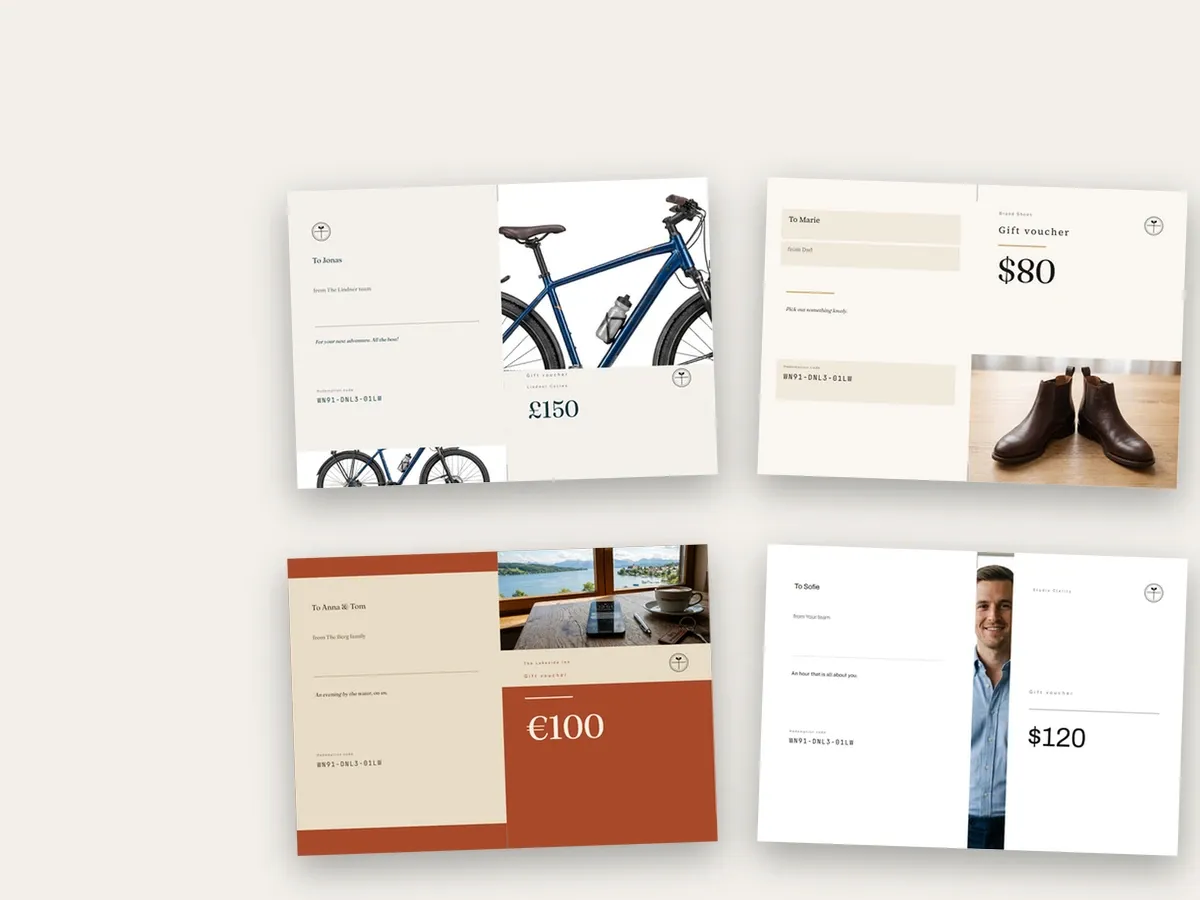
Descriptions as in the app, as of 5 October 2026. The templates are part of Kartuu and included in the price of the app.
What every template comes with
| Feature | Kartuu |
|---|---|
| Two folds in Kartuu: two-page card or four-page cross fold; you choose the fold when you design | Yes |
| Fields for amount or service, gift card code, recipient, sender and message | Yes |
| One swappable picture slot, with up to four pictures for the buyer to pick from if you like | Yes |
| Your logo in two versions, for light and for dark areas | Yes |
| Select, move, rotate and resize every element | Yes |
| Add text, shapes, images, your logo and shop name | Yes |
| Eight handwriting typefaces for text, all with umlauts, ß and € | Yes |
| Change a colour once and it changes across the whole design | Yes |
| A preview while you design and a sample for a test print | Yes |
| Print-ready PDF with fold marks, on A4 or US Letter | Yes |
| Card in English or German | Yes |
As of 5 October 2026. The preview is built on the server from the same document as the PDF and shows the card approximately; lines break differently in print. A test print before going live is worth it.
Template questions, answered
Does Shopify have gift card templates?
According to the Shopify Help Center (the page on customising gift card pages and notifications on help.shopify.com, retrieved 5 October 2026), the gift card page is part of your theme and can be customised there; you replace the default gift card image in the notification email by editing the email template in HTML, CSS and Liquid. The page does not mention a folded card as a PDF. That is what Kartuu’s six templates are for.
Is this the gift_card.liquid theme template?
No. According to Shopify’s developer documentation (shopify.dev, retrieved 5 October 2026), gift_card.liquid is the theme template that renders the gift card page. Kartuu’s templates are designs for a folding card that is generated as a PDF. They do not change your theme’s gift card page, and you need no Liquid to use them.
Do I need Canva or Photoshop?
No. You design in Kartuu’s editor, in the browser: pick a template, move elements, change colours and text. Artwork you made in another program can be uploaded as an image (JPEG, PNG or WebP) and placed on the card.
Can I change a template?
Yes, completely. In the “Design freely” tab every element can be selected, moved, rotated and resized. You swap images, add text, shapes, images, your logo and shop name, set text in one of eight handwriting typefaces (two scripts, a school cursive, a brush script, pen handwriting, a hand-printed face, a playful one and narrow capitals), and a colour you change is replaced everywhere in the design. You save the design under its own name.
What size is the card?
The card is a PDF on one A4 sheet with fold marks, or on US Letter for shops in the US and Canada. Folded once it becomes a two-page card, folded twice a four-page cross fold. You choose the fold when you design the card. For US Letter, choose “English (US)” under Settings in “Language and paper size”; new shops in the US and Canada have it set by default, all other settings print on A4. You design on the same sheet; for Letter the card is scaled down by about 6% and centred, so the folds sit on the middle of the sheet.
Can buyers pick between designs?
They can pick the picture. You offer up to four pictures per gift card; the buyer clicks one on the product page, and the card they buy carries it. Buyers do not upload their own photos. For entirely different designs, say Christmas and birthdays, create several gift card products, each with its own design.
How much does Kartuu cost?
Two plans with the same features: Kartuu Free with no monthly fee and 2.9% of the value of each gift card issued instead, or Kartuu Standard at US$19 per month or US$199 per year with no revenue share, the first 30 days free. Amounts as listed in the Shopify App Store, as of 6 October 2026. Kartuu Standard plus VAT, both plans billed through your Shopify invoice. Offered to businesses only. The six templates and the editor are included.
More on KYTH.Kartuu
KYTH.Kartuu at a glance
Editor, picture choice for the buyer, film and price on one page.
View →How to create a Shopify gift card
Step by step from set-up to published folding card, with a checklist.
View →Printable Shopify gift cards
What is on the printed card and how it reaches the buyer.
View →Pick a template. Make it yours.
Kartuu can be installed from the Shopify App Store: on Kartuu Free with no monthly fee, or on Kartuu Standard with the first 30 days free. Questions first? Write to support@kyth.systems.
Open in the Shopify App Store →