KYTH. Pi-Tool
Your Raspberry Pi. One tap. Fully in control.
Pi-Tool is a lean Android app that installs, updates, backs up and monitors the self-hosted services on your Raspberry Pi over SSH, including remote access and file management.
Get it on Google PlayFree download · optional Pro unlock, a one-time €5
If you run a Raspberry Pi at home, you know the drill: open SSH,
apt update, find the right directory, check Docker
containers, don't forget backups. Pi-Tool takes that off your hands,
tidied up, on your phone, with a single tap.
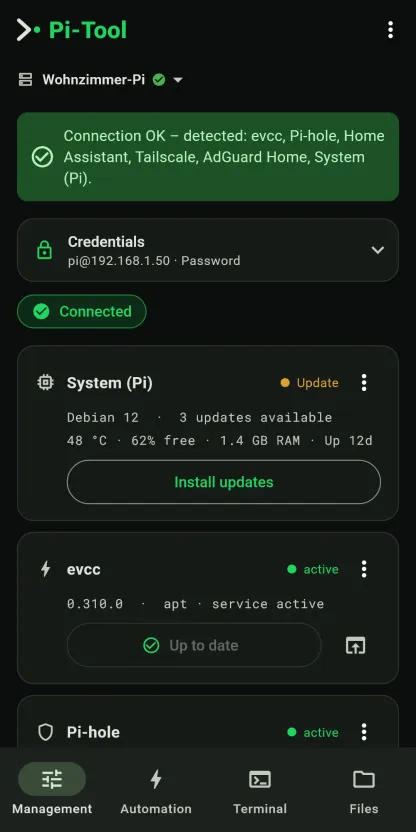
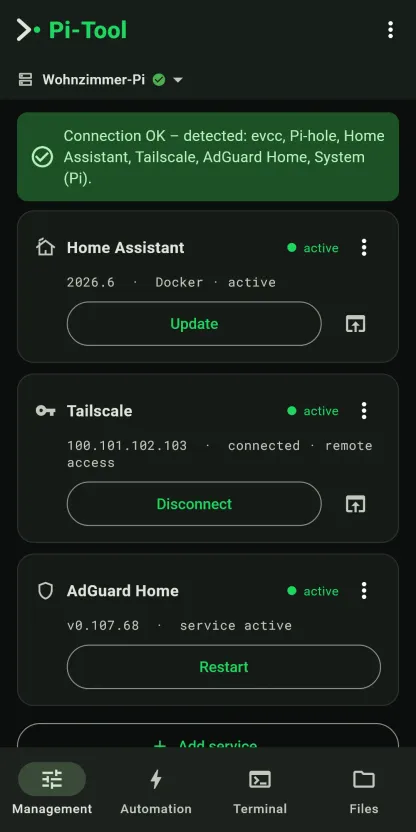
You enter the IP and your Pi login, tap Connect, and Pi-Tool automatically detects the installed services. Each service gets its own card: current status, version, “Update”/“Install” and a direct link to its web interface. Whether evcc runs as an apt package or in a Docker container, the app figures it out and takes the right path.
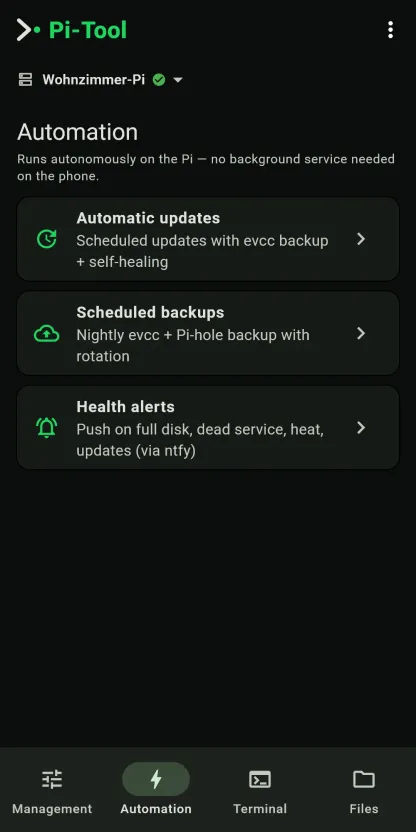
Recurring tasks deliberately run on the Pi, not on your phone: scheduled updates with a prior evcc backup and self-healing, nightly backups with rotation, and push notifications when the disk is full, a service is down or things overheat. So the automation keeps working even when your phone is off.
On top of that: remote access via Tailscale or Raspberry Pi Connect, a terminal for your own commands, a file browser with config editor, and an “All Pis” traffic-light overview when you look after several devices.
Note: Pi-Tool is an unofficial community tool and is not affiliated with evcc or Pi-hole. For day-to-day charge control, use the official evcc app.
A cockpit for your Pi

Everything the Pi needs
Detect services automatically
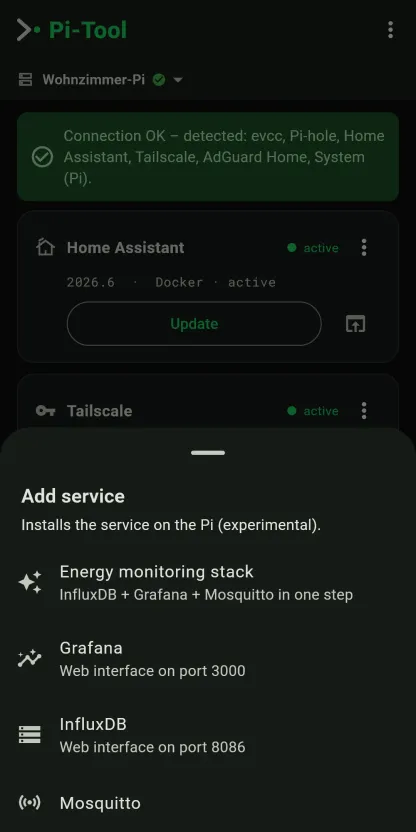
evcc, Pi-hole, Home Assistant, Grafana, InfluxDB, Mosquitto, AdGuard Home, Node-RED, Zigbee2MQTT, Docker and the system, in a single SSH session.
Install & update
Per service, apt or Docker detected automatically; the whole system via apt full-upgrade.
Automation on the Pi
systemd timers instead of a phone background service: scheduled updates with evcc backup + self-healing, nightly backups with rotation, health alerts via ntfy.
Remote access in one tap
Tailscale (VPN/mesh) and Raspberry Pi Connect: install, connect, reach the Pi from anywhere.
Backups
Back up, restore and manage evcc, Pi-hole and Home Assistant, and download to your phone.
Terminal
Your own commands over SSH, with history and quick commands.
Files
File browser (browse, view, upload, delete) plus config editor: atomic, with backup.
System at a glance
Temperature, free storage, RAM, uptime, SD-card check, security check (traffic light), free up space.
Multiple Pis
Quickly switchable profiles, an “All Pis” traffic-light overview, encrypted export/import for your new phone.
Deliberate connect
One clear session to the active Pi: automation, terminal and files unlock only after you connect (since v0.57.0).
Access stays with you
Your credentials never leave the device. No account, no cloud, no middle layer: Pi-Tool talks to your Pi directly over SSH.
- Credentials encrypted on the device (Android Keystore)
- SSH host-key verification (TOFU): protects against man-in-the-middle
- Optional app lock via biometrics/PIN · SSH-key login as an alternative to the password
- No accounts, no ads, no tracking, no cloud
- Platform
- Android (lean Flutter app, light/dark/system theme)
- Connection
- SSH to the Raspberry Pi (password or SSH key)
- Requirement
- A Raspberry Pi reachable over SSH (or a Debian/Linux device)
- Licence
- MIT (open source, “AS IS”)
- Cost
- Free to use; optional Pro unlock (backups, console, multiple Pi profiles) is a one-time €5
- Availability
- On Google Play (listed as “Pi-Tool: SSH Manager”)
Pi-Tool is live.
Download it, connect your Pi, get going: no account, no cloud.
Get it on Google Play Disclaimer: Pi-Tool runs sudo commands
(apt, pihole, systemctl, and possibly
docker compose) on the connected device using the credentials
you enter. Use at your own risk: no liability for damage to your system,
data or hardware (MIT License, “AS IS”).
Trademark note: “evcc”, “Pi-hole”, “Home Assistant”, “Tailscale” and others are trademarks of their respective owners. Pi-Tool is an unofficial community tool and is not affiliated with these projects.
Provider: KYTH. Systems UG (haftungsbeschränkt), Amtsgericht Nürnberg, HRB 46313.
← Back to projects