Invoicing software for trades and small businesses KYTH.Kladde
Write the invoice, finalise it, email it to your customer. Kladde works out interim payments, the final invoice and labour costs, and hands your accountant the DATEV file.
No mail app opening? Write to hello@kyth.systems (subject “KYTH.Kladde access”).
- Interface and invoices in German
- Servers in Berlin
- Emails from your own address
Kladde has been live since November 2026. It is available by invitation, and we set up access for your business.
Everything on it. Nothing forgotten.
This is how a final invoice from Kladde is laid out. The invoice itself is in German; the numbers on the sheet match the points alongside.
-
Numbers without gaps
When finalised, every invoice takes the next number from its sequence, with the year like 2026-042 or 42-26, or just a number that carries on past the turn of the year. No gaps appear.
-
Letterhead to DIN 5008
Address in the window, details alongside, footer on every page. Up to 20 letterheads with their own logo, say for two trades under one roof.
-
VAT per rate
Line items with quantity and unit. Kladde works out the net amount, VAT per rate and the total.
-
Interim payments deducted
The final invoice deducts every interim payment received, VAT included, and states what is still open.
-
Labour costs shown
For private customers, Kladde shows the labour costs included (section 35a of the German Income Tax Act). It is information for your customer.
-
GiroCode for payment
Next to the due date sits a GiroCode. Your customer scans it with their banking app, and the amount and IBAN are already filled in.
Schematic with made-up data. The business, the customer, the amounts and the IBAN do not exist.
From draft to paid.
- 01 Draft
Pick the customer, add the items
Kladde does the sums and, once you save, tells you what the invoice is still missing, field by field.
- 02 Preview
Look at the PDF
Before finalising, you see the invoice exactly as your customer will, just with a draft mark.
- 03 Finalise
Numbered and stored
From then on the invoice stays as it is. Corrections go through a cancellation or a partial correction, each with its own number.
- 04 Send
Email it to your customer
With the PDF to up to three addresses, through your own mail server and with a delivery record per recipient. Or download the PDF.
- 05 Paid
Record the payment
The start page shows what is open and what is overdue. You record the payment on the invoice.
First the invoice. Then the month.
- 01 / 05
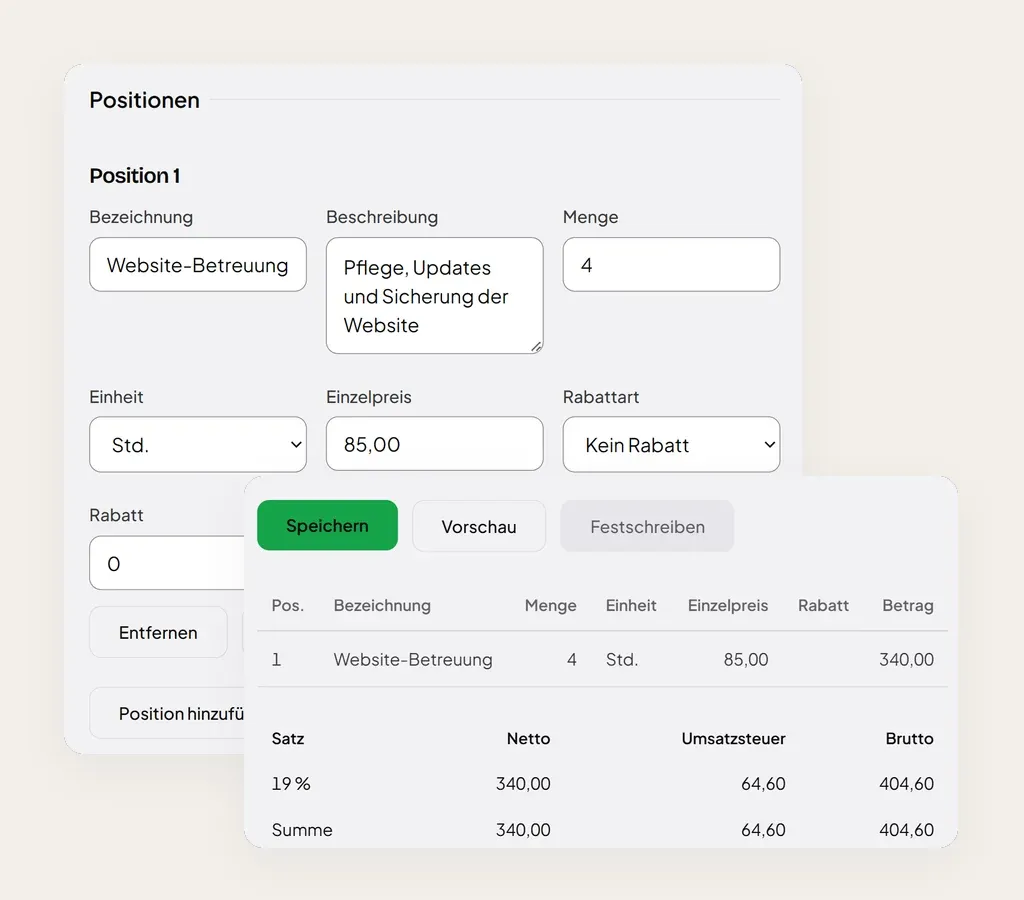
Write the invoice, see the result.
Line items with unit, discount and VAT rate. Below them Kladde works out net, VAT and gross per rate as you go.
- 02 / 05
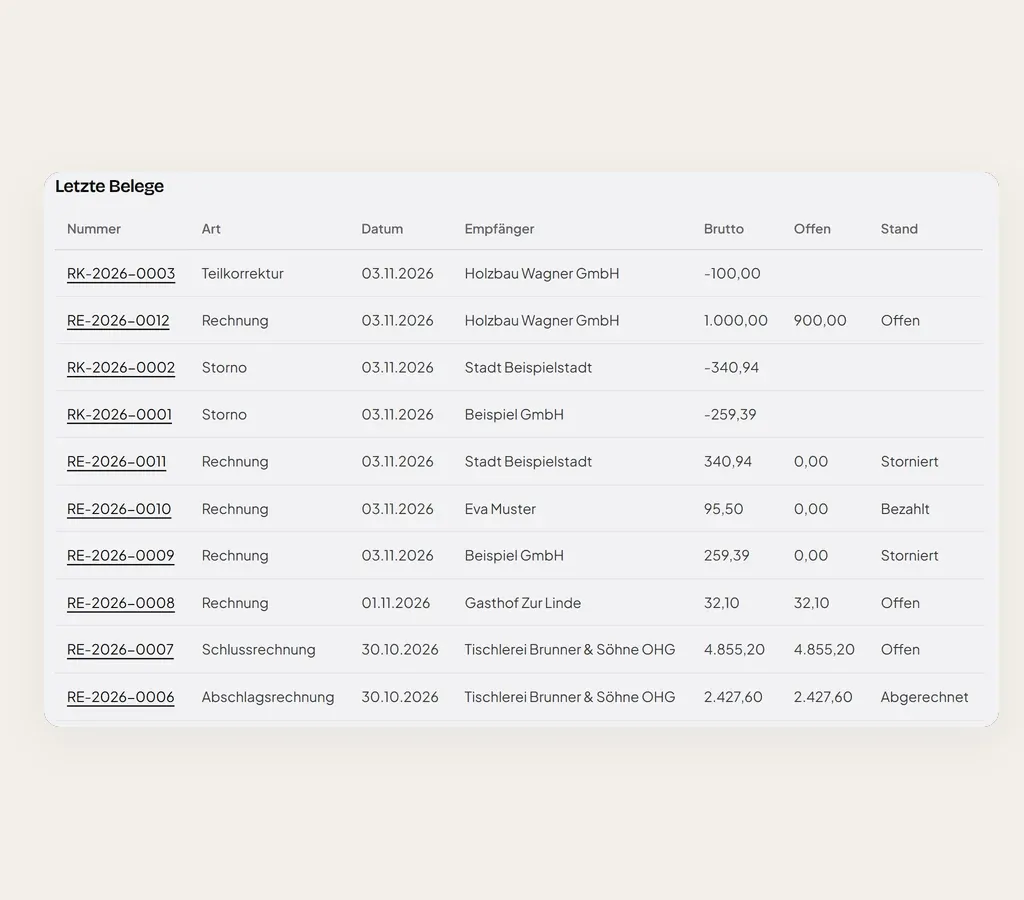
Every document with its status.
Invoices, corrections and cancellations in one list, with the amount outstanding and payment status for each.
- 03 / 05
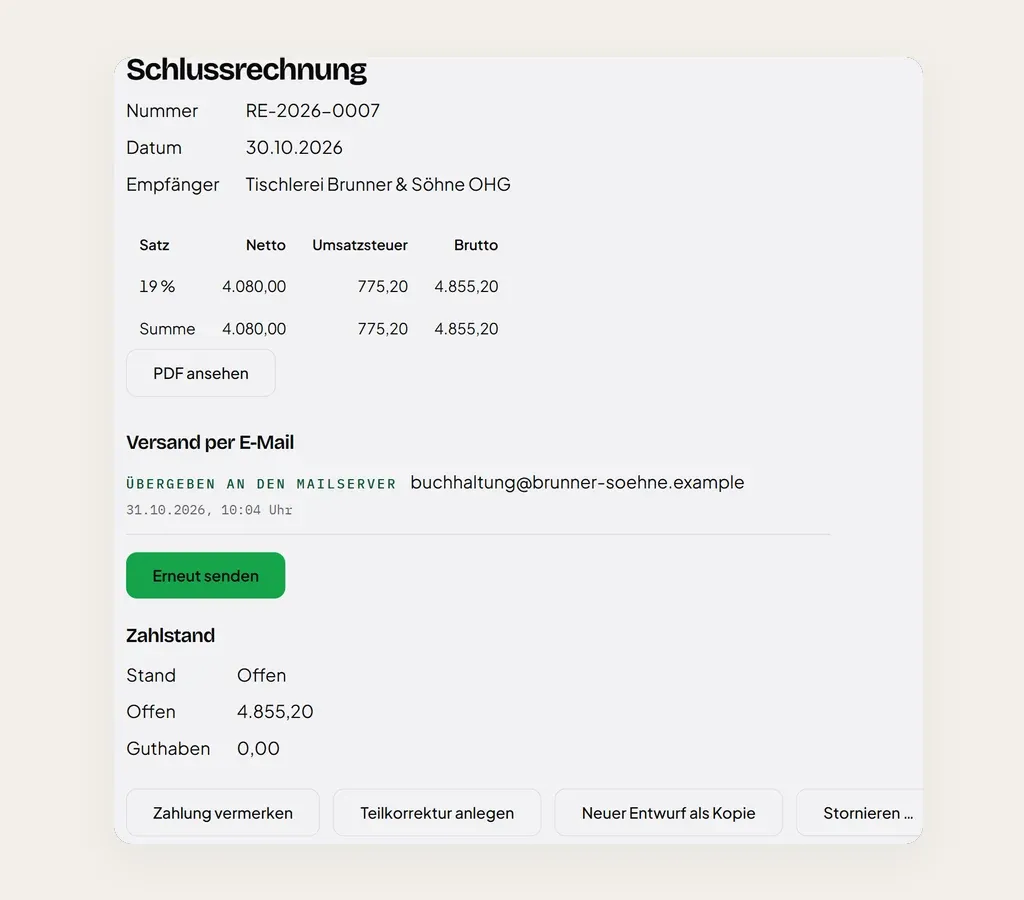
Send, get paid, correct.
Email the invoice to your customer, record payments, issue a partial correction or a cancellation. Every step stays visible on the document.
- 04 / 05
The month for your accountant.
One file per month in DATEV format, with revenue accounts under SKR 03 or SKR 04. Anything not yet in the file is listed next to it.
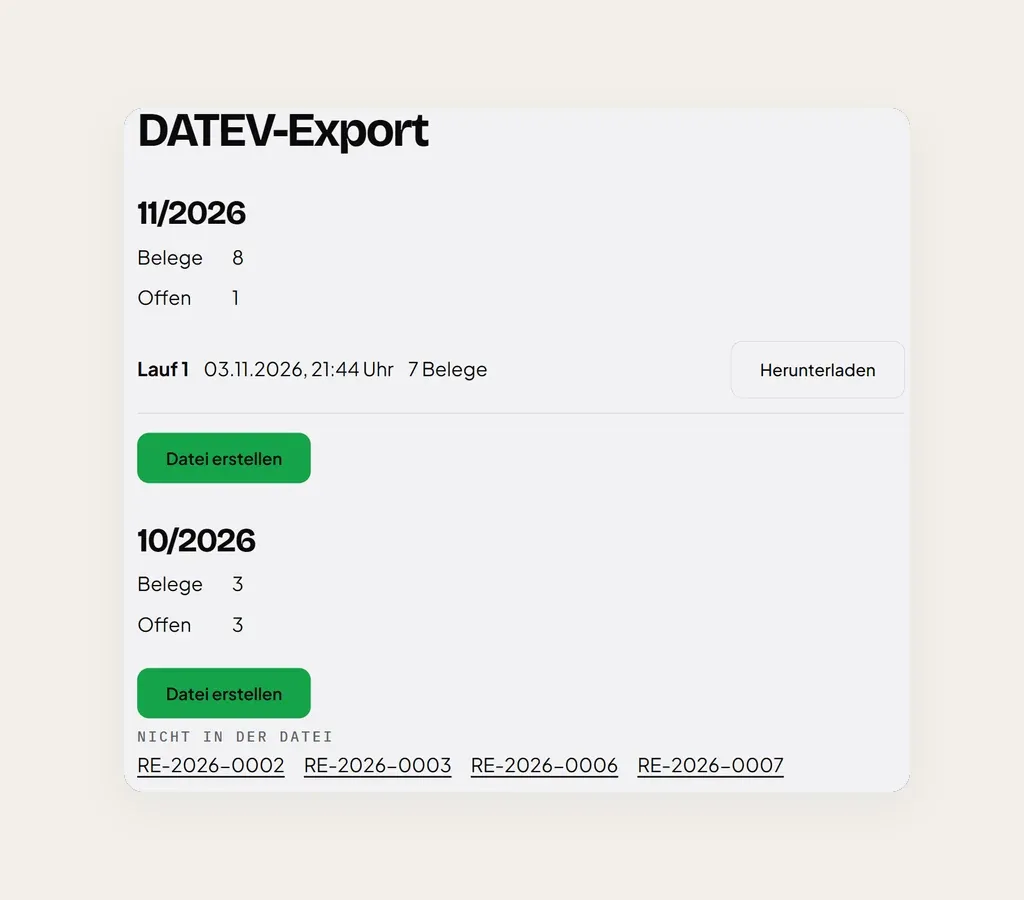
- 05 / 05
On your phone too.
The same Kladde in your phone's browser: create an invoice, change a line item, check the status.
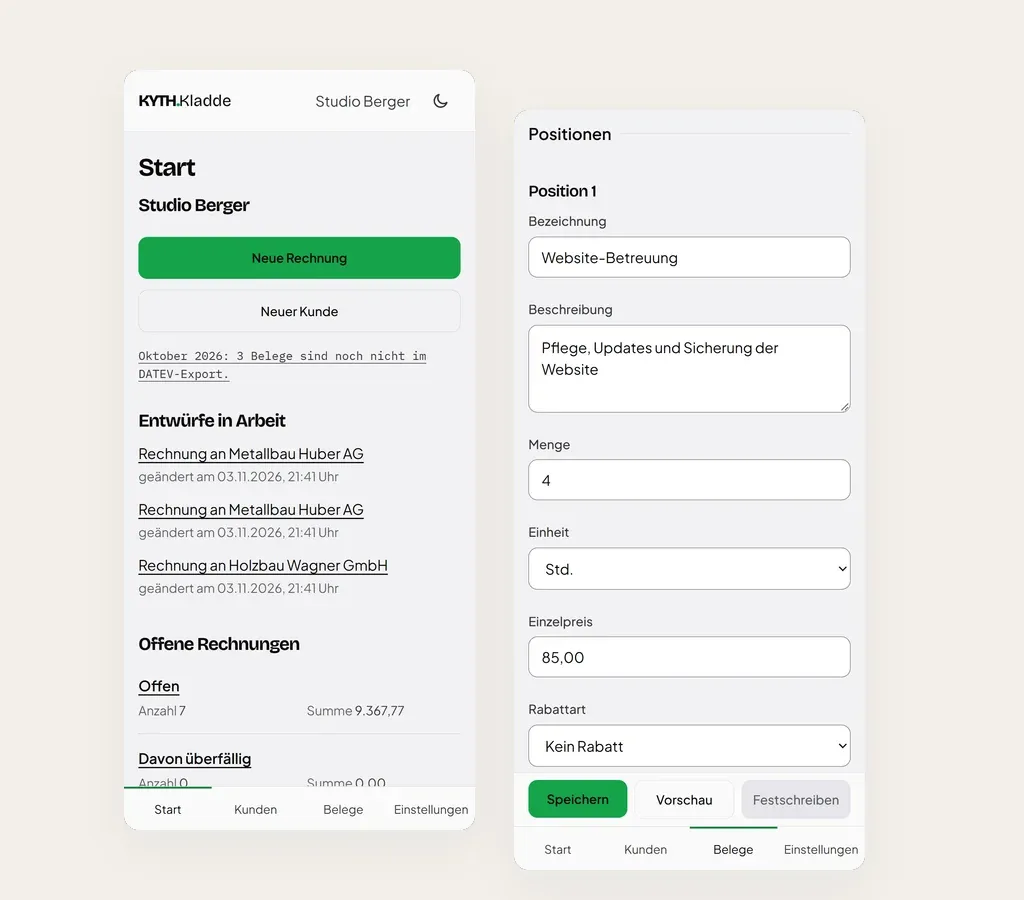
The images show KYTH.Kladde with invented data. The business, customers, amounts and addresses do not exist. The interface is in German.
Built for the building site.
-
Interim and final invoices
Interim invoices get their own number. The final invoice settles them, VAT and early-payment discount included.
-
Labour costs (section 35a EStG)
Kladde works out the labour costs per invoice and prints them for private customers.
-
Construction reverse charge (section 13b UStG)
Choose the tax case and Kladde adds the note that the recipient owes the VAT.
-
Small business scheme
Also under section 19 UStG, with the right note instead of VAT.
-
Early-payment discount and terms
Set them once on the letterhead and they appear on every invoice that uses it.
-
Recurring invoices
Maintenance or upkeep: set up a repeat on an invoice. Due dates appear on the start page, and one tap creates the draft. If you like, Kladde finalises the invoice on the due date and sends it to the customer itself.
-
Cancellation and partial correction
Reverse an invoice or correct part of it, with a reason. Kladde calculates against the state of the whole chain.
-
Notes by tax case
Kladde adds fixed notes by tax case and customer type, for example for work on a property.
From quote to reminder.
-
Quotes and order confirmations
Quotes with their own number and a valid-until date, on your invoice letterhead and emailed to your customer. Once you mark a quote as accepted, one click creates the draft for an order confirmation, an invoice or an interim invoice. Order confirmations also work without a quote.
-
Reminders in three stages
Payment reminder, formal reminder, final reminder, each with a new deadline and as a PDF in the style of the invoice, with a GiroCode for the amount due if the invoice has one. Kladde shows which invoices are due for a reminder. You create and send each one yourself.
-
E-invoices
For businesses in Germany and public authorities, Kladde creates a ZUGFeRD invoice in the EN 16931 profile when you finalise, including interim and final invoices, cancellations and invoice corrections. Authorities also get an XRechnung file to download, which you submit yourself.
-
Customers abroad
For businesses in the EU and beyond, you choose supply of goods or of services and Kladde adds the note: intra-community supply, reverse charge, export or not taxable in Germany. If you use OSS, private customers in the EU are charged their country’s rate, and you get a quarterly overview as CSV. Reporting happens outside Kladde.
In the office. And in the van.
Kladde runs in the browser. Tables on the computer; on your phone, a bar at the bottom and lists instead of tables.
- Several people in the business, each with their own login: owner, staff or read-only, for example for your accountant.
- Up to 20 letterheads with a logo, for example for two trades under one roof. A sample invoice as a PDF shows each letterhead before you write your first real invoice.
- Import customers from a CSV file or the DATEV “Debitoren/Kreditoren” file, with column mapping and a preview.
- Number sequences for invoices, corrections and customer numbers. If you switch from another program, you carry on with your existing sequence.
- Find customers and invoices as you type, also by town, street and contact person.
- Monthly DATEV export as a booking batch (SKR03 or SKR04) to download for your accountant.
- One account for several businesses, if you run more than one.
- Light or dark, and your device remembers the choice.
Hosted in Berlin. Sent by you.
Servers in Berlin
Kladde runs on a server operated by IONOS SE in Berlin. Backups are made daily and encrypted, also in Berlin.
Your sender address
Invoice emails go through your own mail server, from your address and with your text, without a KYTH footer. A test email checks the connection first.
A login for every person
No shared password: everyone signs in with their email address and password and has their own role. Owners also confirm each sign-in with a code from an authenticator app; for everyone else this second factor is optional. Owners can see the log.
Your data belongs to you
As an owner you can download a complete copy of all your business data as a ZIP at any time: customers, documents with PDF and XRechnung, quotes and order confirmations, reminders, DATEV files and the log. After the contract ends, this remains possible for 30 days.
One price. For the whole business.
- Every feature Kladde has today
- Every user in your business, including read-only access for your accountant
- No fee per invoice
To read up on: Terms of use · Data processing agreement · Privacy policy (in German)

Forellenzucht Grasse GbR, a family fish farm in Pilsach, Bavaria, writes its invoices with Kladde.
What Kladde doesn't do.
-
No bookkeeping
Kladde writes invoices and records payments. Bookkeeping and tax returns stay with your accountant; the DATEV file gets the invoices there.
-
No tax advice
You choose the tax case and the rate. Kladde calculates from what you enter and adds the fixed notes.
-
Businesses only
Access is for businesses and the self-employed, for their trade or profession, not for consumers.
No legal or tax advice. As of 12 November 2026.
Frequently asked.
How do I get Kladde?
Kladde is available by invitation. Write to hello@kyth.systems and tell us what your business does. We set up your space and send you an invitation. After that you sign in at kladde.kyth.systems/anmelden. There is no self sign-up.
How much does Kladde cost?
€15 per month per business, plus VAT. That covers every feature Kladde has today and every user in your business. There is no fee per invoice.
Is Kladde available in English?
No. The interface and the invoices are in German, and Kladde is built for German tax rules.
Do I need to install anything?
No. Kladde runs in the browser, on your computer and on your phone. There is no app in an app store.
Can I write interim invoices and a final invoice?
Yes. Every interim invoice gets its own number. The final invoice deducts each interim payment received, VAT included, applies any early-payment discount and shows what is still outstanding.
Does Kladde show labour costs under section 35a EStG?
Yes. Kladde works out the labour costs contained in each invoice and prints them on invoices to private customers. The figure is information for your customer.
Does Kladde handle the construction reverse charge (section 13b UStG)?
Yes. Choose this tax case and Kladde adds the note that the recipient owes the VAT. Whether the case applies is your call.
Does Kladde work for small businesses under the small business scheme?
Yes, including section 19 UStG. The invoice then carries the right note instead of VAT. Kladde alerts small businesses to the turnover thresholds as soon as the payments recorded approach them.
Can my customer pay by QR code?
Yes. Next to the due date there is a GiroCode. Your customer scans it with their banking app, and the amount and IBAN are already filled in.
Can I change an invoice after finalising it?
No, it stays as it is. You reverse it with a cancellation or correct part of it with a partial correction. Both get their own number and belong to the invoice's chain.
How do the invoices reach my accountant?
Through the DATEV export: a monthly booking batch in DATEV format (SKR03 or SKR04) to download. Kladde does not transfer anything to DATEV itself. Your accountant can also get their own read-only login.
How are invoices emailed?
Through your own mail server. An owner enters the connection once and checks it with a test email. After that, you send each invoice with its PDF to up to three addresses and see a delivery record per recipient.
Can I write quotes with Kladde?
Yes. When you issue a quote, it gets its number from its own number range and a valid-until date, 30 days by default. You record whether the customer accepts or declines. On an accepted quote, one click creates the draft for an order confirmation, an invoice or an interim invoice; if interim invoices are still open, it becomes the final invoice. There are no optional items and no acceptance via a link.
Can Kladde send payment reminders?
Yes, in three stages: payment reminder, formal reminder and final reminder, each a separate letter for one invoice with a new deadline. You set the intervals per stage, and Kladde shows which invoices are due. You can add a fee per stage (€0 by default) and the €40 flat fee under section 288(5) BGB; Kladde does not offer the flat fee for private customers. Kladde does not calculate default interest or send reminders on its own, and court dunning proceedings and debt collection are not part of it.
Can Kladde create e-invoices?
Yes. For businesses in Germany and public authorities, Kladde creates a ZUGFeRD invoice in the EN 16931 profile when you finalise it, a PDF with embedded XML, and attaches it to the invoice email. Authorities also get an XRechnung file to download; you submit it yourself, as Kladde does not deliver to portals or Peppol. With gross prices, for businesses abroad and for private customers, you get the PDF only. Kladde does not receive or check incoming e-invoices. Whether you need an e-invoice (section 14 UStG) and whether a recipient accepts it in this form is for you to clarify with your tax adviser and the recipient.
Does Kladde work for customers abroad?
Yes, for businesses in the EU and beyond. You choose supply of goods or of services, and Kladde sets the tax case and the note, such as reverse charge or a tax-free intra-community supply. In the EU cases the invoice needs your VAT ID and the customer’s; Kladde only checks their format, and you confirm them with the BZSt (Federal Central Tax Office). If you use OSS, Kladde charges private customers in the EU their country’s VAT rate and shows a quarterly overview by country and rate, also as CSV. Reporting, including the recapitulative statement, happens outside Kladde. Invoices in other currencies are not available.
Can I bring my customers along?
Yes, from a CSV file or from the “Debitoren/Kreditoren” file exported by DATEV. First Kladde shows the format it recognised, how many customers will be imported and how many rows have errors, and when expanded, the list with the customer numbers they would get. Kladde maps the columns by their headings. If a customer number from the file is already taken, Kladde uses the next free one, and the preview shows that. A second import does not create a customer that already exists. Nothing is imported until you confirm.
Let's talk.
Kladde does the sums. What goes on the invoice is your call.
Request access
Drop us a line about your trade and how many invoices you send a month. We set up access for you.
Request accessNo mail app opening? Write to hello@kyth.systems (subject “KYTH.Kladde access”).
Not ready yet? Sign up and we will write to you when Kladde starts for you.